 الإنجليزية
 中文简体
中文简体 Русский
 Español
 Português
 Türkçe
 العربية
 Deutsch
 Polski
 Italiano
 Français
 한국어
한국어 ไทย
ไทย Tiếng Việt
 日本語
日本語











الطيفية المحمولة
مستخدم المالكين
قابل للتطبيق LISUN models: HSCD-780、HSCD-800،HSCD-860
1. فتح العلبة والتعرف الأساسي على المعدات
1.1 المواصفات الفنية الرئيسية
| المواصفات/أرقام الطراز | HSCD-780 | HSCD-800 | HSCD-860 |
| الميزات الرئيسية | Small-Caliber Testing | اختبار عالي الدقة | |
| هيكل القياس | د / 8 ، اصابات النخاع الشوكي | D / 8 ، SCI + SCE | |
| تكرار القياس | ΔE*ab ≤ 0.05 | ΔE*ab ≤ 0.04 | ΔE*ab ≤ 0.02 |
| Difference between platforms | لا يوجد | ΔE*ab ≤ 0.4 | ΔE*ab ≤ 0.2 |
| دقة العرض | 0.01 | ||
| قطر القياس | 1 stabilizer: Φ1 mm | There are two types: stable and agile: Φ11mm, ▽11mm | There are a total of 6 stable and agile types: Φ11 mm + Φ6 mm + Φ3 mm, ▽11 mm + ▽6 mm + ▽3 mm |
| معلمات القياس | CIE-Lab, CIE-LCh, HunterLab, CIE-Luv, XYZ, Yxy, RGB, color difference (ΔE*ab, ΔE*cmc, ΔE*94, ΔE*00), whiteness (ASTM E313-00, ASTM E313-73, CIE, ISO 2470/R457, AATCC, Hunter, Taube Berger Stensby), Yellowness (ASTM D1925, ASTM E313-00, ASTM E313-73), blackness (My, dM), color transfer fastness, color change fastness, tint (ASTM E313-00), color density CMYK (A, T, E, M), metamerism index Milm, Munsell, Hiding Power, Color Strength (Dye Strength, Tinting Power), Spectral Reflectance | ||
1.2 فتح العلبة والتحقق من المحتويات
1.2.1 فك التغليف والفحص البصري
عند إخراج الجهاز من العبوة، تعامل معه برفق لتجنب خدش غلافه بأدوات حادة. بعد إخراجه، افحص الجزء الخارجي منه للتأكد من عدم وجود أي تشوهات أو انبعاجات ظاهرة، وأن الأزرار سليمة وغير مفكوكة. في حال ملاحظة أي خلل في الجهاز أو ملحقاته، يرجى التواصل معنا فورًا.
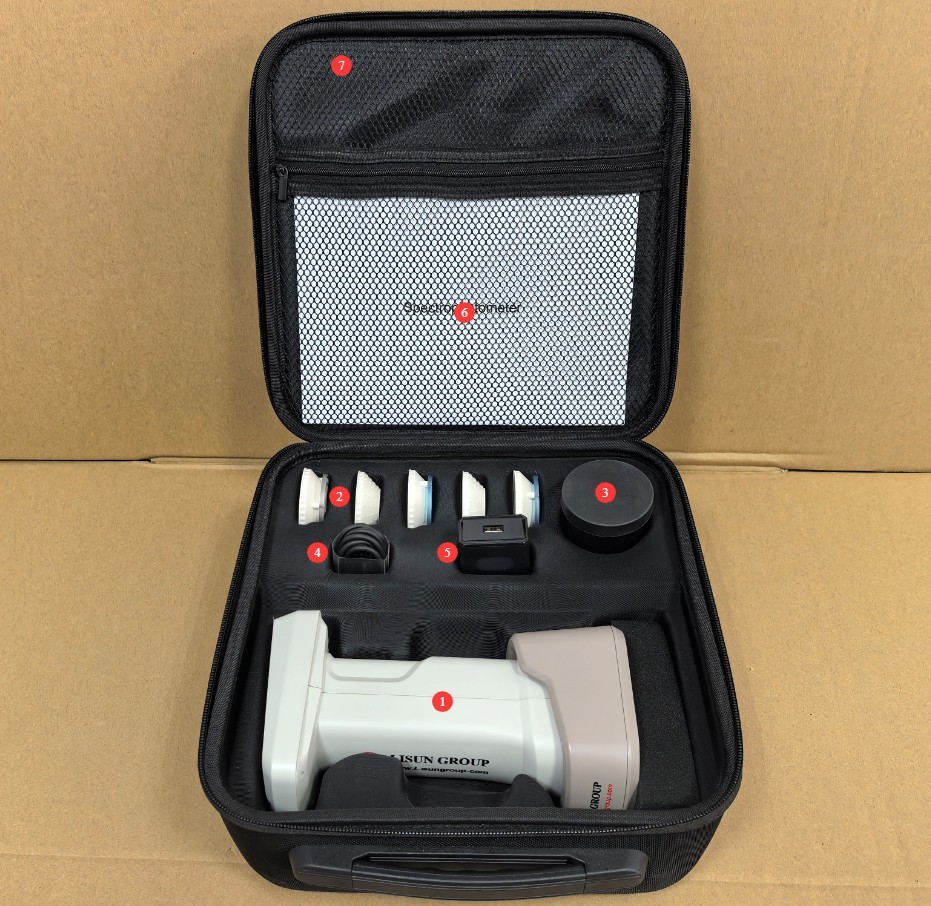
1.2.2 الوحدة الرئيسية والملحقات
| رقم الهاتف | ملاحظات |
| ① | HSCD-860, including a calibration whiteboard stand and one measuring aperture |
| ② | Other alternative measurement diameters are available and can be selected based on the sample. |
| ③ | Black Calibration Box |
| ④ | كبل USB |
| ⑤ | شواحن |
| ⑥ | دليل البدء السريع |
| ⑦ | حقيبة يد |
الشكل 1
تم إرسال روابط تحميل دليل المستخدم الرقمي، والبرامج، وبطاقة الضمان، وغيرها من المواد عبر البريد الإلكتروني. يُرجى تحميلها في أقرب وقت ممكن. إذا لم يصلك البريد الإلكتروني، يُرجى التواصل معنا لطلب روابط التحميل مرة أخرى.
1.3 وصف هيكل المعدات
| رقم الهاتف | ملاحظات |
| ① Touchscreen | Display measurement results and configure parameters |
| ② USB port | Can be used to communicate with a computer |
| ③ Device Buttons | Power On (press and hold for 1 second), Power Off (press and hold for 3 seconds), Color Measurement (press briefly), Color Difference Measurement (press briefly) |
| ④ Selecting the Diameter Size | You can switch between M and S; the letter must match the letter on the measurement orifice. |
| ⑤ Calibrate the whiteboard stand | Used to calibrate equipment; it attaches to the measuring orifice end of the device via a magnetic mount. |
| ⑥ USB port | Can be used to charge devices |
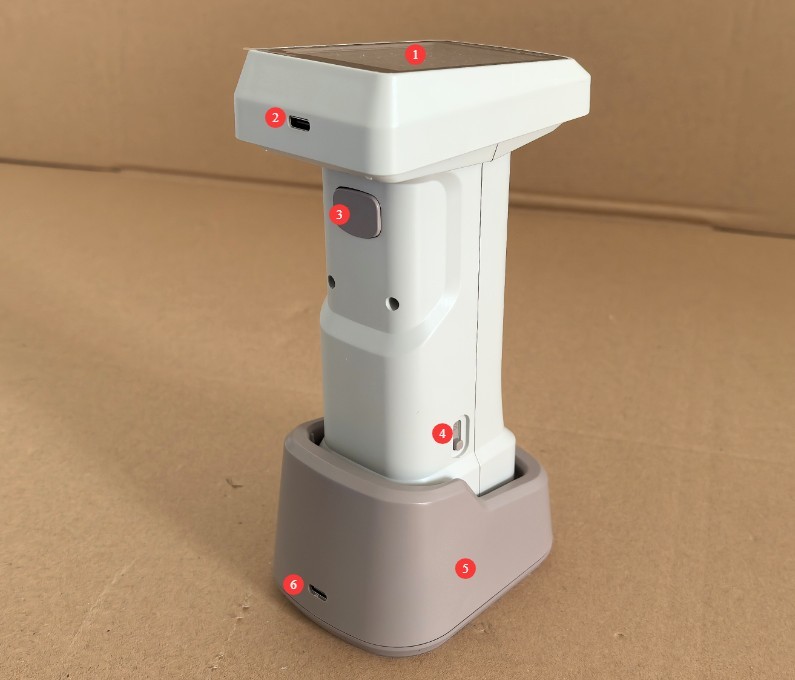
الشكل 2
2. احتياطات الاستخدام
2.1 الاحتياطات قبل التشغيل
2.1.1 تهيئة البيئة
Before taking a measurement, allow the device and the sample to be measured to sit in the same environment for at least 30 minutes to ensure their temperatures are consistent. The measurement environment must be free from direct strong light and stray light interference. Avoid operating in environments with high temperatures, high humidity, or high dust levels. The ambient temperature should ideally be maintained between 10°C and 35°C, with relative humidity ≤80%(no condensation).
2.1.2 تحضير العينة
The surface of the sample being tested must be flat, clean, free of stains, and free of scratches. If the sample is a powder or liquid, it must be placed in a special sample dish to ensure that the sample surface completely fills the measurement aperture without any gaps; Select an appropriate measurement aperture based on the shape of the sample. Ensure that the measurement end fits snugly against the sample’s measurement area to prevent light leakage.
2.1.3 فحص المعدات
قبل تشغيل الجهاز، تأكد من خلو منفذ القياس من الغبار والأوساخ، وأن الأزرار والمنافذ تعمل بشكل سليم. بعد تشغيل الجهاز، تأكد من شحن البطارية بشكل كافٍ (إذا كانت البطارية منخفضة الشحن، اشحنها أولاً لتجنب انقطاع التيار الكهربائي أثناء القياس).
2.2 احتياطات للاستخدام
2.2.1 إجراءات القياس
When taking a measurement, position the device’s sensor perpendicular to and in close contact with the sample surface to avoid tilting or light leakage. After pressing the confirmation button, keep the device still until the measurement is complete (1 second); do not move the device during the measurement process. It is recommended to take 3–5 measurements of the same sample and use the average as the final result to minimize measurement errors.
2.2.2 مواصفات التشغيل الوظيفي
Do not force a shutdown or disconnect the USB cable during the device’s self-test, calibration, or measurement processes. When switching measurement parameters, wait until the display has finished loading before proceeding to the next step. If you need to export saved measurement data, ensure the connection is established before shutting down the device to prevent data loss.
2.2.3 موانع استخدام المعدات
Do not touch the optical components inside the measurement port with your hands, and do not point the measurement end toward a strong light source. Since this is a handheld device, do not drop, bump, or crush it, and avoid exposing the body to water or other liquids.
2.3 سلامة مصدر الطاقة والبطارية
The built-in lithium-ion battery has a capacity of 3000mAh and is compatible only with the standard charger. Please note: Using a non-standard charger—especially a high-current fast-charging power adapter—can easily damage the battery.
Do not use the device for extended periods when the battery level is below 15%; do not charge the battery after it has been severely discharged, to avoid shortening its lifespan.
تأكد من تهوية المنطقة جيدًا أثناء الشحن، وأبقِ الشاحن بعيدًا عن المواد القابلة للاشتعال، وافصله فورًا بعد اكتمال الشحن.
If the device will not be used for an extended period, fully charge it first, and then top it off every three months to prevent the battery from becoming damaged due to discharge.
2.4 تحذيرات السلامة
لا تحاول تفكيك أو استبدال أي أجزاء داخلية للجهاز. في حال حدوث عطل، اتصل بخدمة العملاء الرسمية أو بموزع معتمد للحصول على المساعدة. التفكيك غير المصرح به يُبطل الضمان.
If liquid, dust, or other substances enter the device, immediately turn off the power, unplug the charging cable, and contact customer service right away. Do not continue to use the device;
If equipment and accessories (such as measuring gauges) are accidentally swallowed by children, they may pose a risk of choking or other hazards; therefore, the equipment must be kept out of the reach of children;
لا تضع الجهاز بالقرب من مصادر الحرارة أو اللهب المكشوف أو في بيئات ذات درجات حرارة عالية لمنع انتفاخ البطارية وتلف مكونات الجهاز.
3. تشغيل المعدات
3.1 معايرة المعدات
The device must be recalibrated when used for the first time or after being idle for more than 8 hours. Before turning on the device, place it on the calibration whiteboard base; once powered on, the device will automatically perform a white calibration.
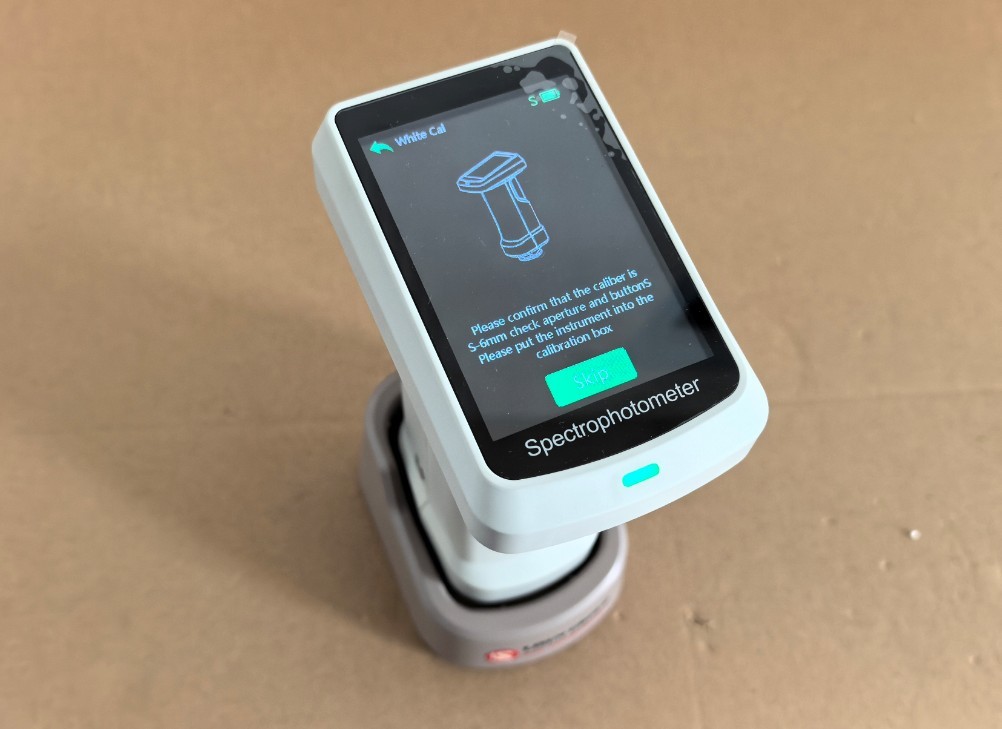
الشكل 3
Once white calibration is complete, the system will automatically proceed to the black calibration screen. Follow the on-screen prompts and place the black calibration box under the measurement aperture.
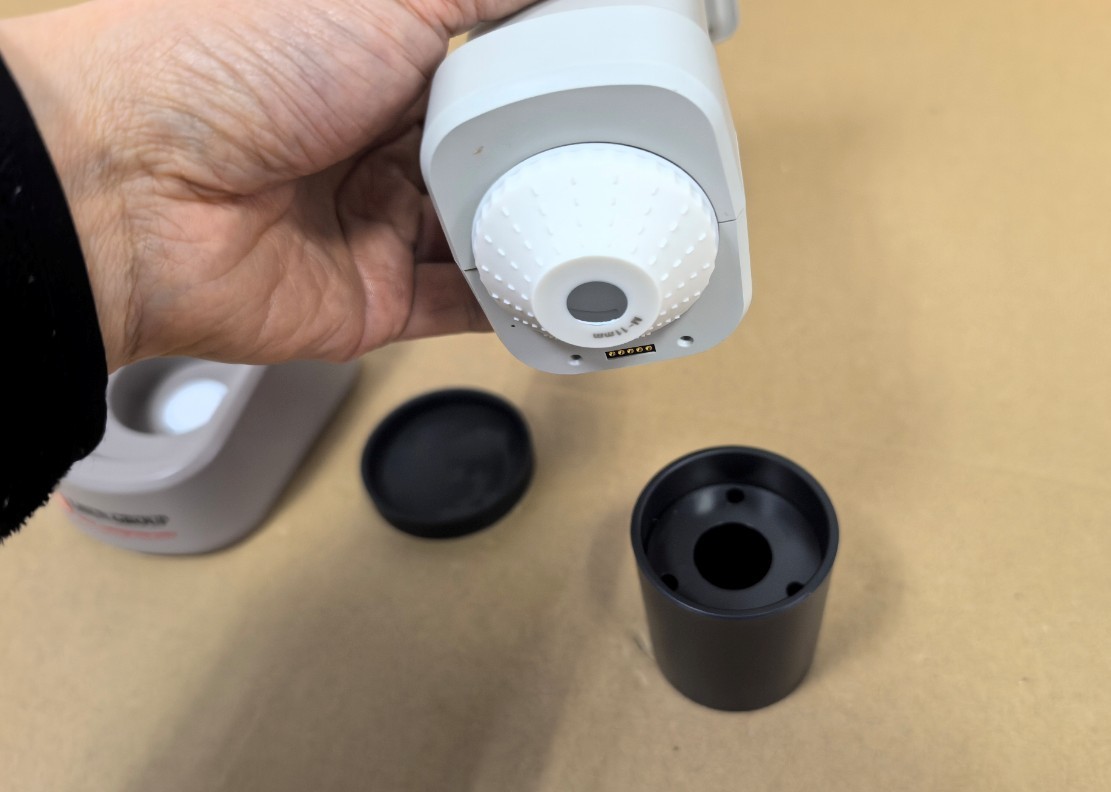
الشكل 4
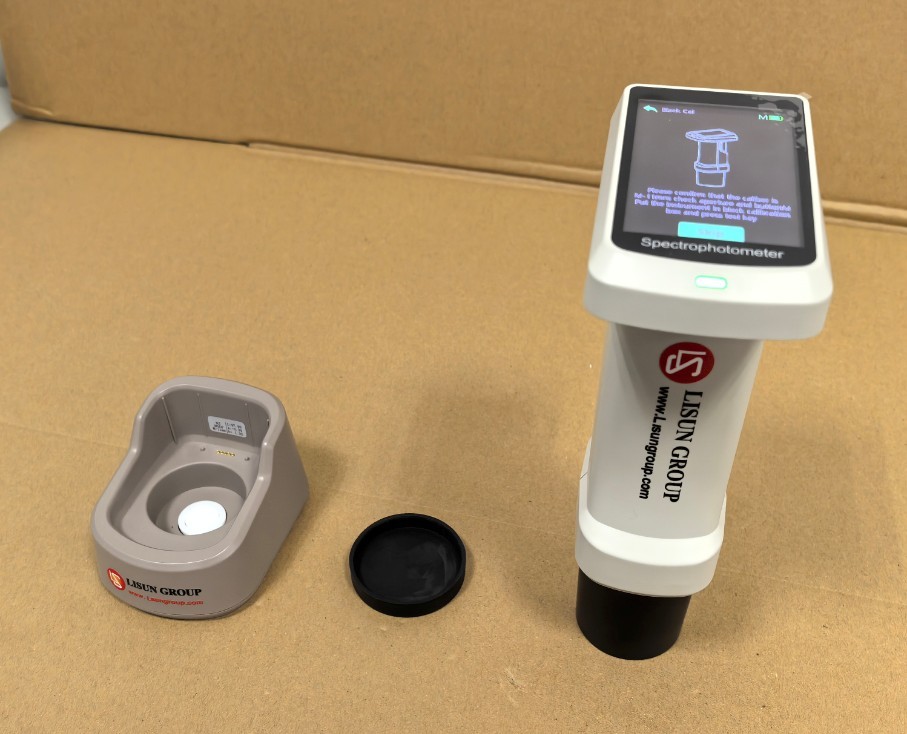
الشكل 5
Then, briefly press the device button to complete the black calibration. The device will automatically enter the measurement screen.
Note: After replacing the measurement aperture with a different size, refer to Section 3.4.3.3 on active white and black calibration before proceeding with measurements.
3.2 قياس اللون
3.2.1 إجراء قياس اللون
Press the device button once briefly to perform a color measurement. The device displays CIE-Lab parameters by default. You can start by measuring the calibration whiteboard.
| رقم الهاتف | ملاحظات |
| ① | Click to save the color measurement results |
| ② | Click to open the color difference measurement interface |
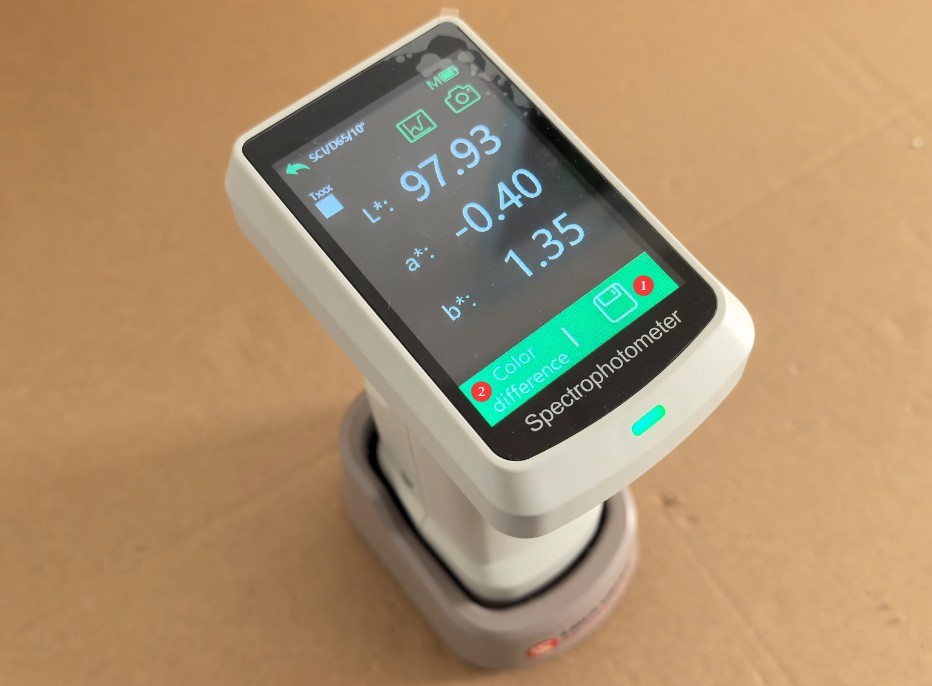
الشكل 6
If the parameters match those marked on the calibration whiteboard stand, this indicates that the device’s test results are accurate.
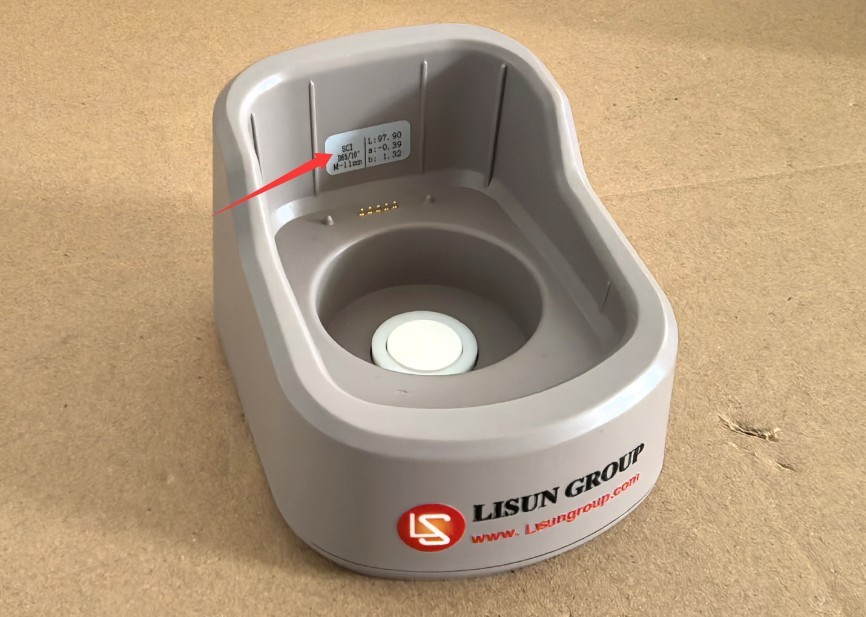
الشكل 7
Note: The base is marked with the measurement aperture required for calibrating the whiteboard, as well as its CIE-Lab values.
3.2.2 Other Features
| رقم الهاتف | ملاحظات |
| ① | طيف |
| ② | الكاميرات والتصوير |
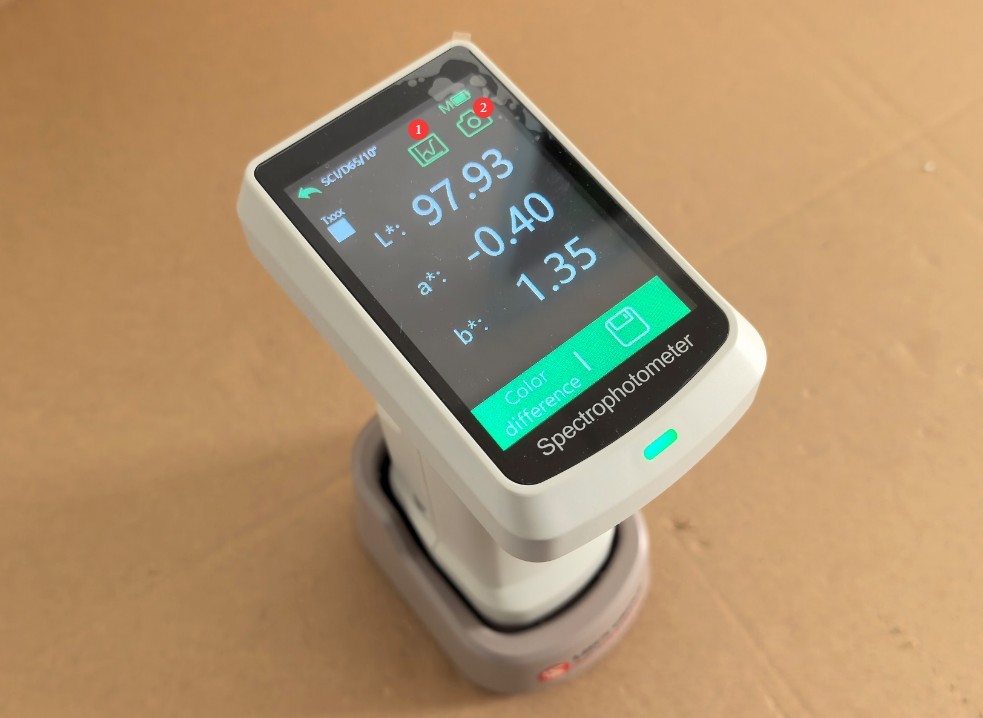
الشكل 8
Click the “Spectrum” feature.
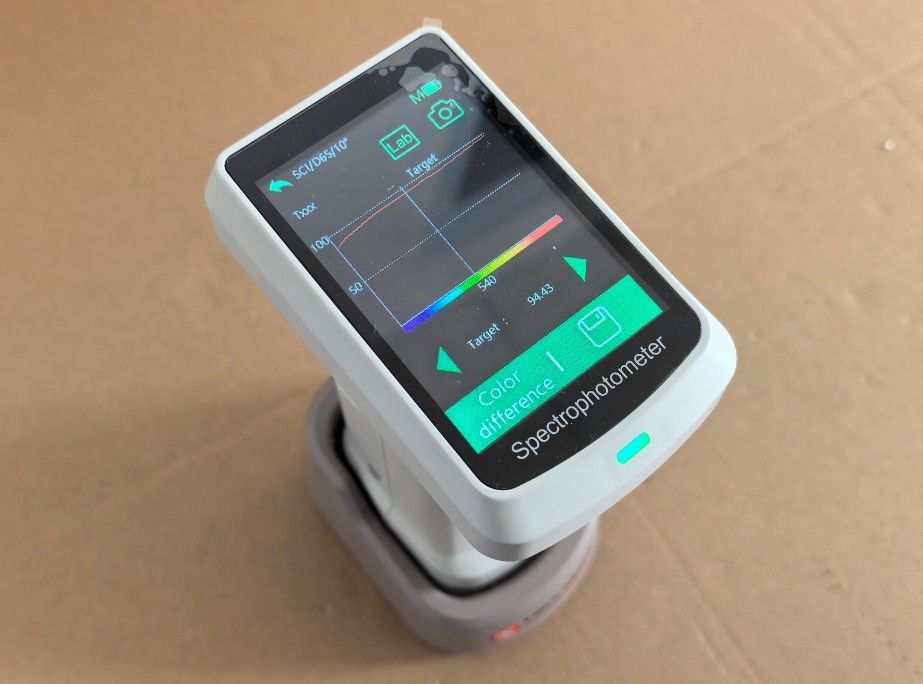
الشكل 9
Tap the camera feature to verify that the sample is positioned within the measurement aperture.
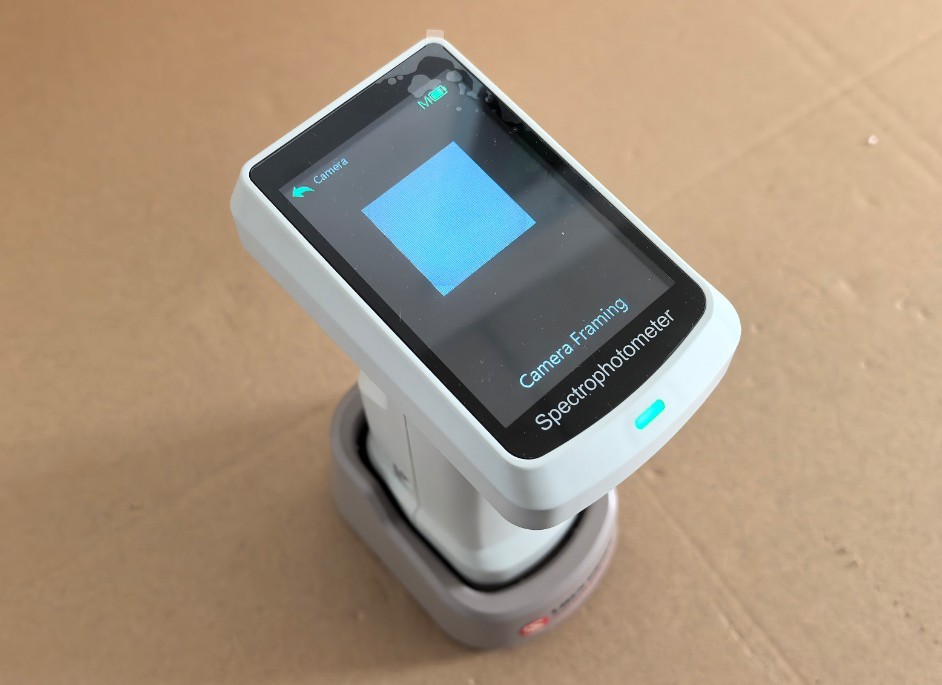
الشكل 10
3.3 إجراء قياس اختلاف اللون
3.3.1 قياس العينات المرجعية أولاً
The procedure for measuring the standard sample is the same as that for measuring color.
3.3.2 إعادة قياس فرق اللون
Click to open the color difference measurement interface.
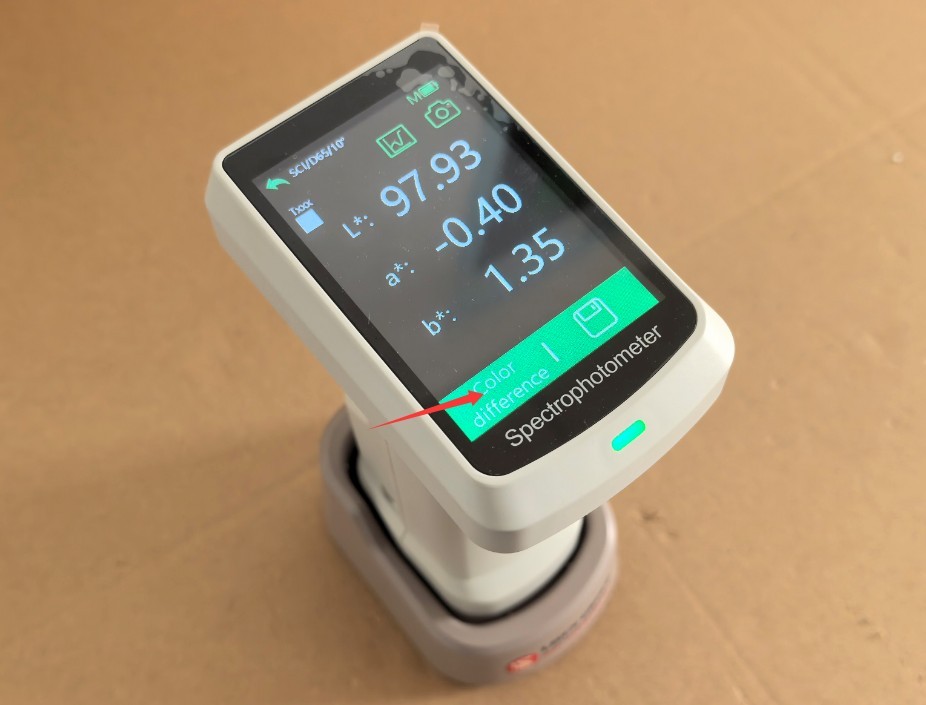
الشكل 11
Then place the measuring aperture on the surface of the sample, briefly press the device button, and the color difference measurement will begin. The touchscreen interface displays the sample measurement results, as well as the color difference between the sample and the reference standard.
| رقم الهاتف | ملاحظات |
| ① | Click to save the measurement results |
| ② | Click to return to the Color Measurement/Reference Sample Measurement screen |
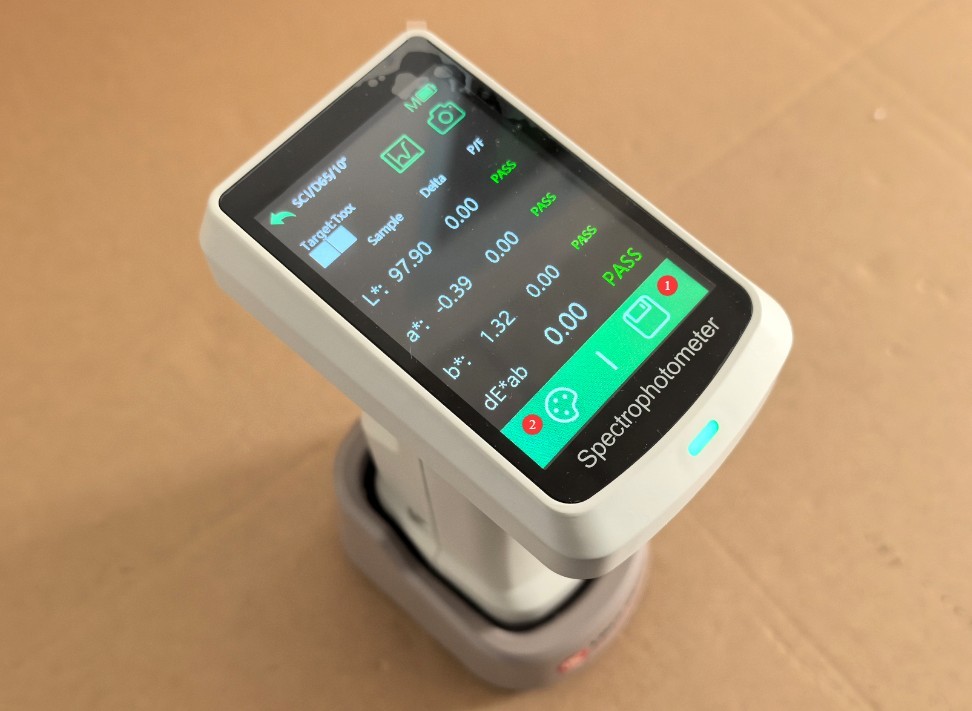
الشكل 12
3.4 Introduction to Other Function Screens
3.4.1 Preview of the Functional Interface
Click to access the navigation screen for all device features.
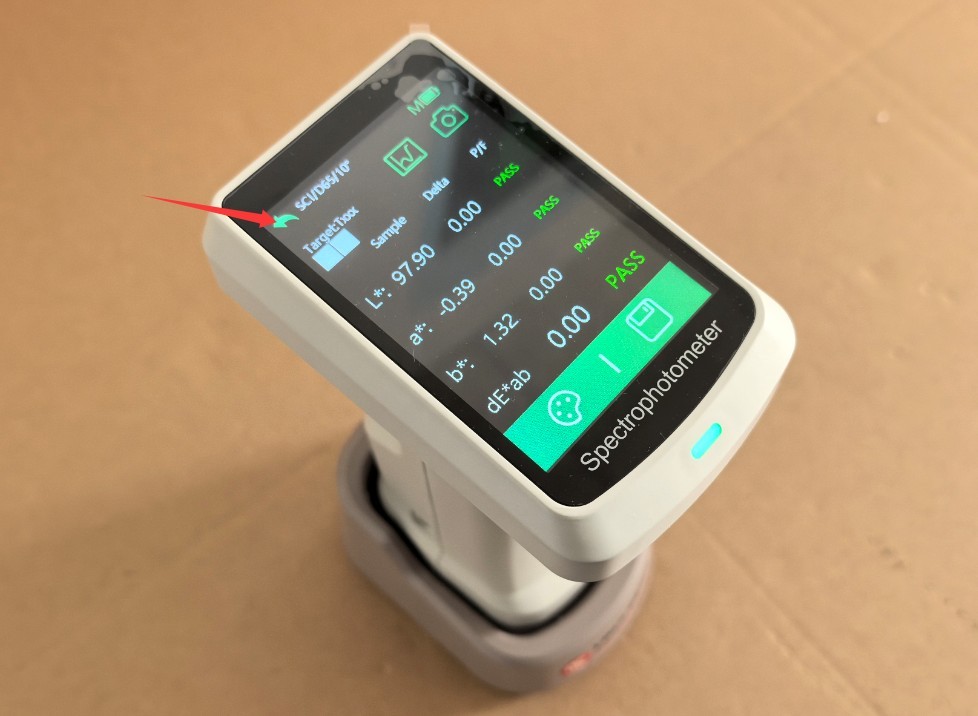
الشكل 13
| رقم الهاتف | ملاحظات |
| ① | واجهة القياس |
| ② | View more information about the current measurement results |
| ③ | View Saved Color Swatches |
| ④ | إعدادات المعلمات |
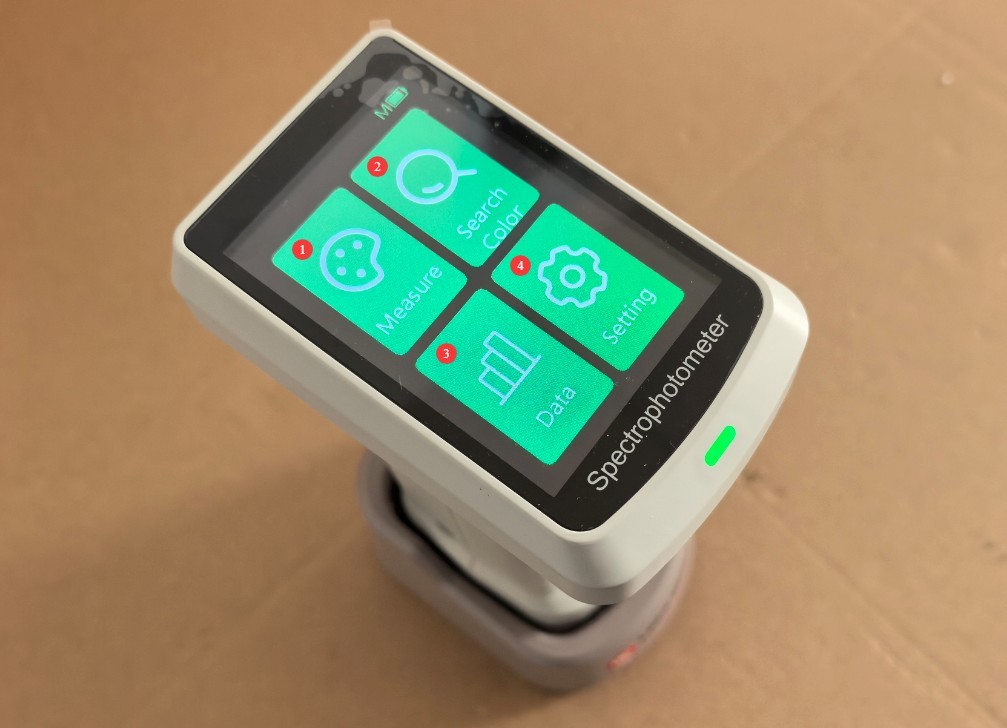
الشكل 14
3.4.2 Viewing Saved Color Swatches
You can click to select a color swatch you saved previously.
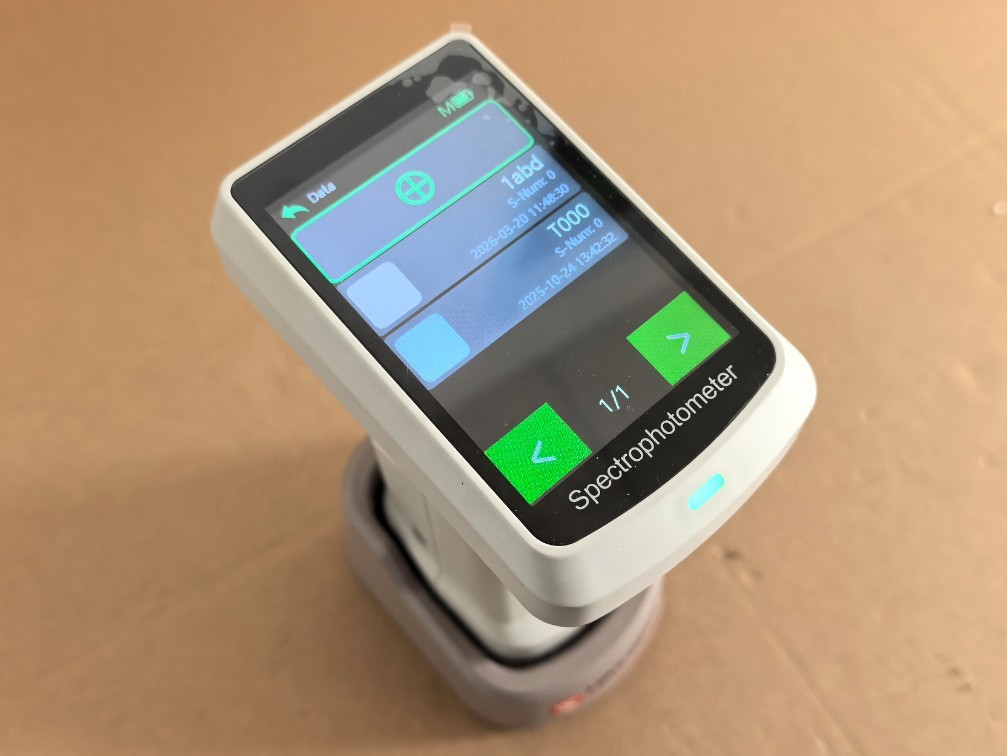
الشكل 15
Click to use the current color chart as the reference standard and measure the color difference.
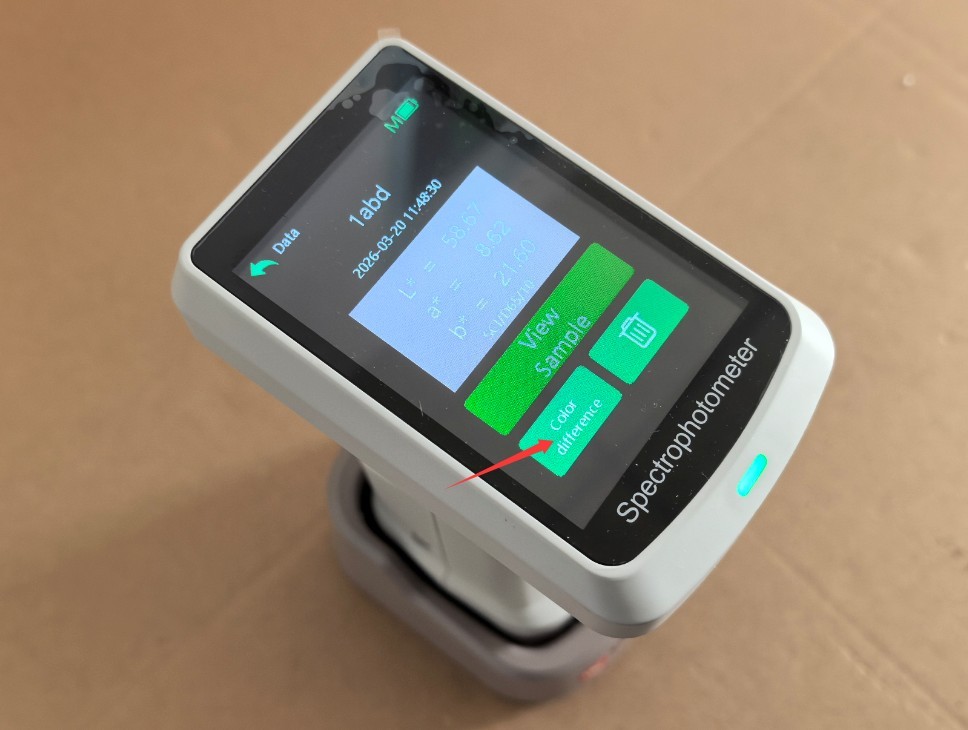
الشكل 16
3.4.3 واجهة إعدادات المعلمات
| رقم الهاتف | ملاحظات |
| ① | إعدادات معلمات القياس |
| ② | إعدادات مصدر الطاقة |
| ③ | اعدادات الوقت |
| ④ | Display Language Settings |
| ⑤ | معايرة: |
| ⑥ | Product Information Screen |
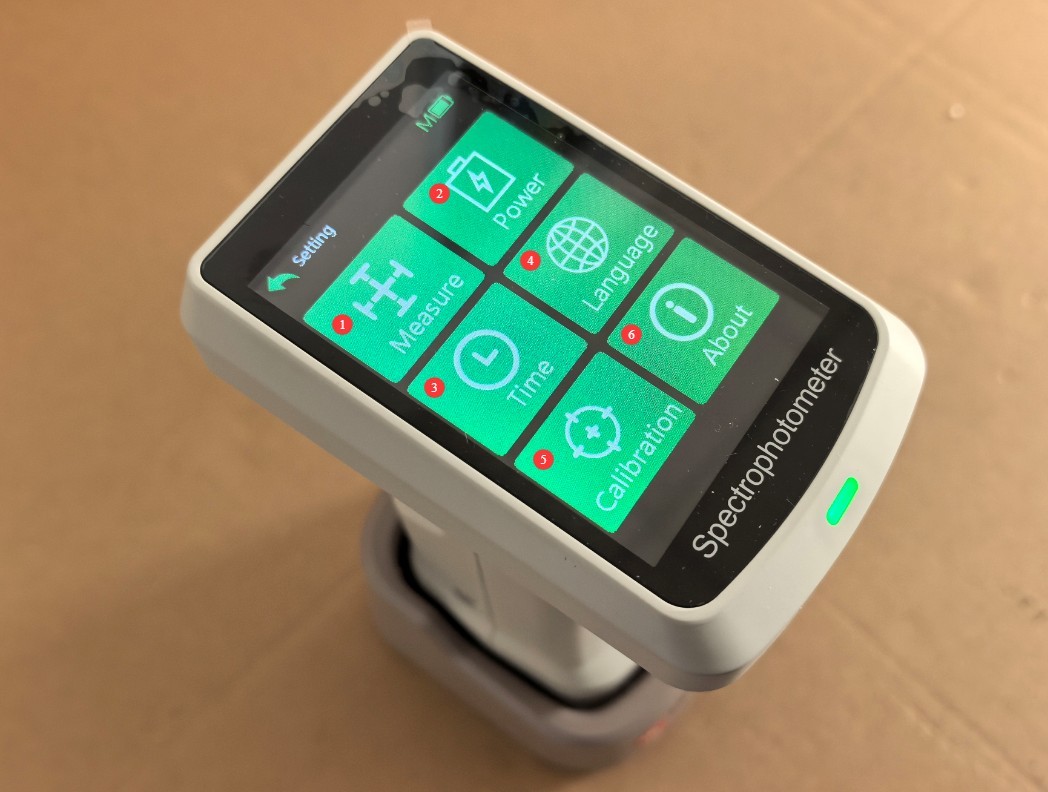
الشكل 17
3.4.3.1 إعدادات معلمات القياس
You can configure the parameters you want to measure and modify the measurement settings.
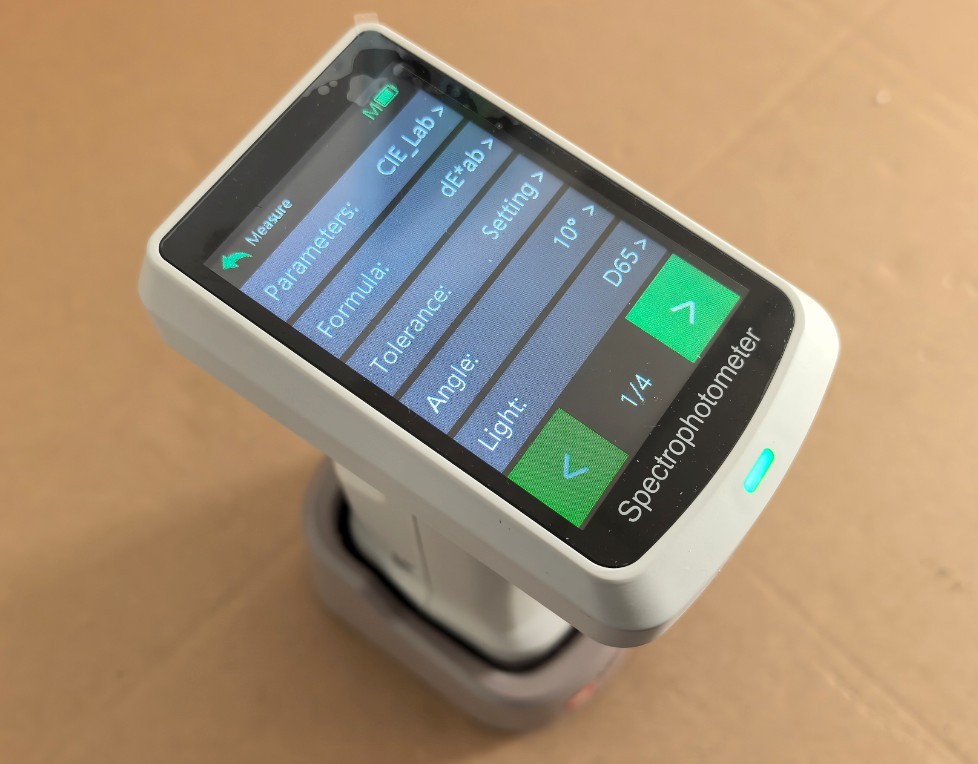
الشكل 18
استخدم HSCD-860 can measure dozens of parameters; the default measurement parameter is CIE-Lab.
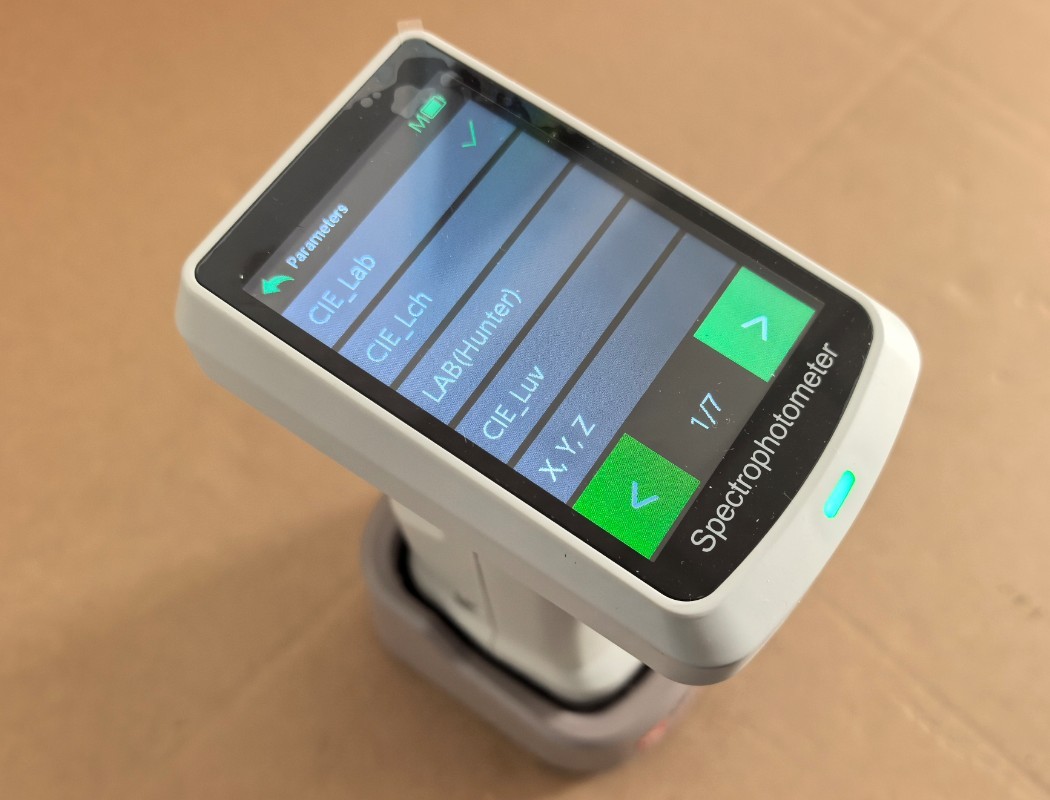
الشكل 19
Note: After modifying the measurement parameters, please refer to Section 3.4.3.3 and run the calibration again.
3.4.3.2 Power Supply Parameter Settings
| رقم الهاتف | ملاحظات |
| ① | Automatic Shutdown Settings |
| ② | Auto-Screen-Off Settings |
| ③ | Bluetooth Switch (Note: You must turn on Bluetooth to connect the device using the mobile app.) |
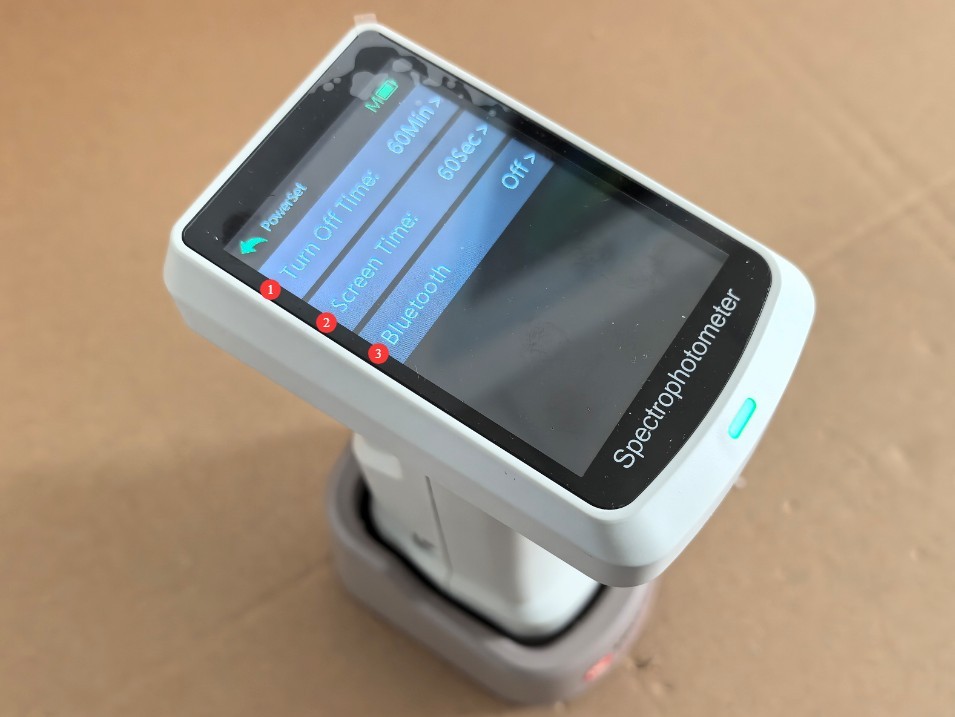
الشكل 20
3.4.3.3 المعايرة
Place the device on the calibration whiteboard base, then tap to enter the calibration interface. The device will automatically perform white calibration; then, follow the instructions in Section 3.1 to perform black calibration.
4. تشغيل التطبيق
4.1 Online
Follow the instructions below to install the app on your phone.
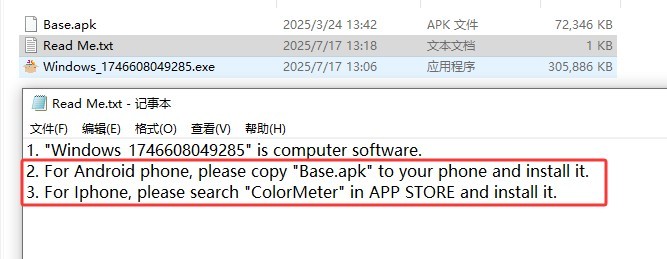
الشكل 21
Refer to Section 3.4.3.2 to enable the HSCD-860’s Bluetooth functionality.
افتح التطبيق واضغط على "اتصال".
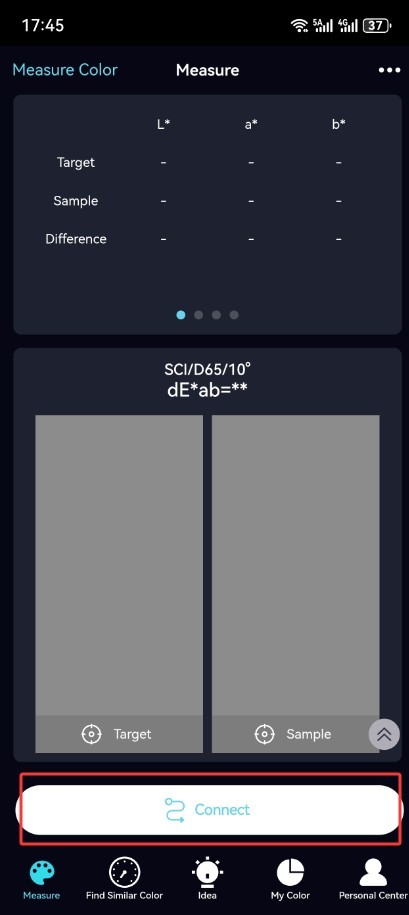
الشكل 22
4.2 المعايرة
If the app prompts you to calibrate, follow the instructions to perform white calibration and black calibration.
4.3 إجراء القياس
4.3.1 قياس اللون وقياس فرق اللون
| رقم الهاتف | ملاحظات |
| ① | انقر على اليسار لقياس لون أو قياس عينة قياسية. |
| ② | انقر على اليمين لقياس فرق اللون في العينة |
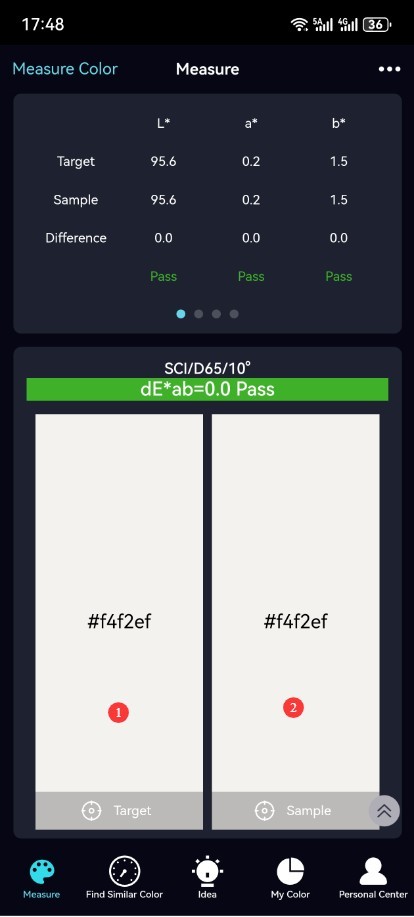
الشكل 23
5. تشغيل البرنامج
5.1 التوصيل والمعايرة
Refer to Section 1.3. Connect the HSCD-860 to the computer using the dedicated USB cable, and turn it on. Install the following software on the computer.
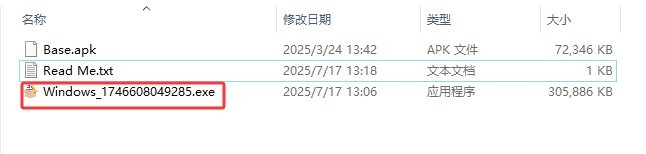
الشكل 24
| رقم الهاتف | ملاحظات |
| ① | هذا برنامج مدفوع لإدارة الألوان؛ لست مضطرًا لاستخدامه. |
| ② | Double-click to open this software; once it opens, it will automatically connect to the internet. |
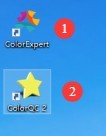
الشكل 25
If the software prompts you to perform calibration, follow the on-screen instructions to perform white and black calibration.
5.2 تشغيل البرمجيات
| رقم الهاتف | ملاحظات |
| ① | انقر لقياس اللون (قياس العينة المرجعية) |
| ② | انقر لقياس فرق اللون في العينة |
| ③ | قائمة نتائج القياس لجميع المعايير المرجعية |
| ④ | Color difference measurement results for all samples relative to the reference standard |
| ⑤ | You can print and save measurement results; you can create a new measurement interface and open previously saved measurement reports. |
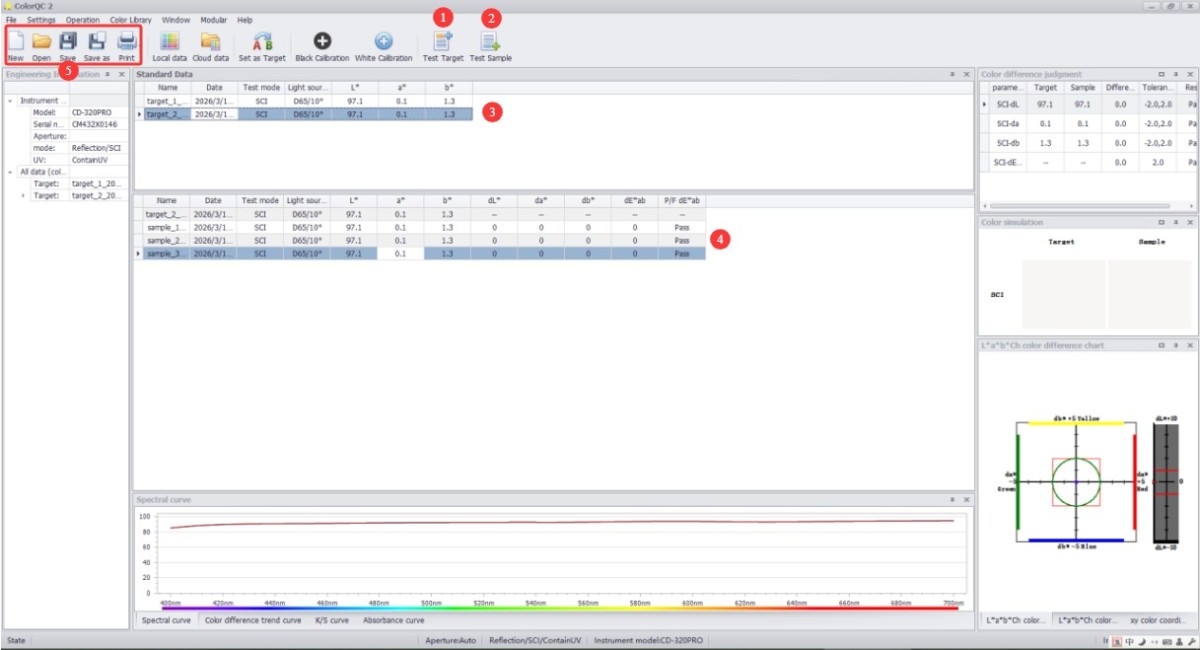
الشكل 26
6. الصيانة اليومية للمعدات والعناية بها
6.1 التنظيف والصيانة
6.1.1 تنظيف الهيكل والشاشة
سطح الجسم: امسح الغبار والبقع عن الجسم بقطعة قماش نظيفة وناعمة. بالنسبة للبقع المستعصية، امسح المنطقة برفق بكمية قليلة من الماء. لا تستخدم المنظفات أو السوائل الكاوية الأخرى؛
الشاشة: امسح الشاشة برفق بقطعة قماش مخصصة لتنظيف الشاشات لتجنب خدشها. لا تلمس الشاشة مباشرةً بأصابعك. إذا تراكم الغبار على الشاشة، أزله برفق بفرشاة ناعمة خالية من الوبر.
6.1.2 تنظيف لوحة المعايرة
The calibration plate is a standard accessory; surface wear or stains will affect calibration accuracy: Gently wipe the surface of the calibration plate with a lint-free cloth; if there are stubborn stains on the surface of the calibration plate, contact customer service promptly to have it replaced. Do not sand or repair the calibration plate yourself.
6.2 صيانة البطارية
6.2.1 الشحن والصيانة
Use the USB cable that came with the device. Avoid charging the device in high-temperature environments, and unplug the cable immediately after charging is complete to prevent overcharging. Charge the device promptly when the battery level falls below 15% to avoid deep discharge of the lithium battery, which can shorten its lifespan.
6.2.2 صيانة عمر البطارية
The device’s built-in lithium-ion battery is rechargeable; under normal use, a single charge allows for 10000 consecutive measurements;
When the device is not in use for an extended period, ensure the battery charge remains between 50% and 80%. Recharge the battery once every three months to restore the charge to between 50% and 80%, thereby preventing the battery from becoming deeply discharged or swelling;
إذا ظهرت على البطارية علامات انتفاخ أو تسرب أو انخفاض كبير في عمر البطارية، فتوقف عن استخدامها على الفور واتصل بنا لإصلاحها.
استكشاف الأخطاء وإصلاحها وحل المشكلات الشائعة
| أعراض الخلل | الأسباب المحتملة | العملية |
| تعذر تشغيل الجهاز | البطارية ضعيفة | يرجى استخدام كابل USB المخصص لشحن الجهاز؛ إذا لم يتم تشغيله بعد الشحن، فيرجى الاتصال بنا لإصلاحه. |
| تدهور عمر البطارية | تدهور البطارية، ارتفاع درجة الحرارة المحيطة | Contact us for repairs; using the device in high-temperature environments causes the battery to drain quickly—please use it in a normal environment. |
| أخطاء كبيرة في بيانات القياس | Failure to perform white and black calibration promptly and accurately; contamination of the calibration white plate; errors in the measurement of reference standards; contamination of the measurement aperture | Perform white and black calibration correctly; clean or replace the calibration white plate; remeasure the reference samples; clean the inside of the test ports with a lint-free brush; if the test ports show signs of physical damage, please contact us for repair. |