
 الإنجليزية
 中文简体
中文简体 Русский
 Español
 Português
 Türkçe
 العربية
 Deutsch
 Polski
 Italiano
 Français
 한국어
한국어 ไทย
ไทย Tiếng Việt
 日本語
日本語


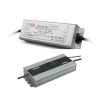










مزود طاقة تيار مستمر رقمي بتيار ثابت وجهد ثابت
مستخدم المالكين
قابل للتطبيق LISUN الموديلات: DC3005S،DC3010S،DC6005S
1. فتح العلبة والتعرف الأساسي على المعدات
1.1 المواصفات الفنية الرئيسية
| المواصفات/أرقام الطراز | DC3005S | DC3010S | DC6005S |
| الطاقة الانتاجية القصوى | 30 V / 5 A | 30 V / 10 A | 60 V / 5 A |
| قرار الجهد | 0.001 V (0–60 V) | ||
| دقة الجهد | ±(0.02% من القراءة + 0.05% من النطاق + رقم واحد) | ||
| القرار الحالي | 0.001 و | ||
| الدقة الحالية | ±(0.05% of reading + 0.05% of full scale + 1 digit) | ||
1.2 التحقق من تكوين المعدات
1.2.1 فك التغليف والفحص البصري
عند إخراج الجهاز من العبوة، تعامل معه برفق لتجنب خدش الغلاف الخارجي بأدوات حادة. بعد إخراجه، افحص الجزء الخارجي من الجهاز للتأكد من عدم وجود أي تشوه أو انبعاجات ظاهرة، وأن الأزرار سليمة وغير مفكوكة. إذا لاحظت أي خلل في الجهاز أو ملحقاته، فلا تقم بتشغيله. يرجى الاتصال بنا فورًا.
1.2.2 الوحدة الرئيسية والملحقات
| رقم الهاتف | ملاحظات |
| ① | DC-S Series Power Supplies |
| ② | السلطة الحبل |
| ③ | كابل اتصال RS-232 |
Download links for the electronic user manual, software warranty card, and other documents have been sent via email. Please download them as soon as possible. If you missed the email, please feel free to contact us to request the download links again.
ملاحظة: جميع LISUN spectroradiometer software can control the DC-S series power supplies; however, the DC-S power supplies sold separately do not come with dedicated software. Please operate them using the front panel of the device.
2. احتياطات السلامة
2.1 معايير السلامة الكهربائية
The equipment’s input power supply is single-phase AAC 220 V ±10%, 50/60 Hz. It must comply with safety standards and have a reliable protective grounding system with a protective grounding resistance of ≤4 Ω to prevent electric shock.
2.2 معايير السلامة البيئية
For indoor use only; avoid direct sunlight. Place on a sturdy, stable surface to prevent excessive vibration. Ensure the environment is free of dust, corrosive gases, and flammable or explosive materials. Keep away from strong magnetic and electric fields. Ensure adequate ventilation; leave at least 10 cm of space around the device for heat dissipation, and do not block the cooling fan vents. Operating Environment: Temperature 5°C to 35°C, relative humidity ≤65% RH.
2.3 إرشادات السلامة التشغيلية
Do not operate the equipment or plug in or unplug the power cord with wet hands; Output must be turned off before connecting or disconnecting wires; do not touch the output terminals, internal components, the load, or load wiring while the equipment is operating; do not shut down the equipment directly while it is in output mode; turn off the output first before shutting down the equipment; if you notice an unusual odor, smoke, unusual noise, or overheating, immediately disconnect the power and do not continue operation.
3. نظرة عامة على المعدات والأسلاك
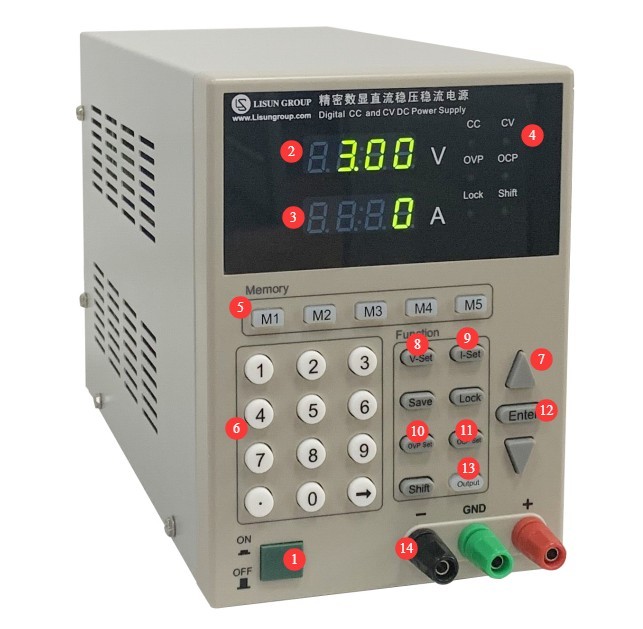
3.1 مقدمة عن اللوحة الأمامية
| رقم الهاتف | ملاحظات |
| ① | مفتاح الطاقة |
| ② | نافذة عرض الجهد V؛ يظهر الرمز "—–" عندما يتجاوز الجهد الحد المسموح به. |
| ③ | Current display window A; “—–” appears when the limit is exceeded. |
| ④ | Indicator lights. CC: Constant Current; CV: Constant Voltage; OVP: Overvoltage Protection Triggered; OCP: Overcurrent Protection Triggered |
| ⑤ | Memory Keys: The device can store 5 sets of configuration data, allowing for quick setup. |
| ⑥⑦ | You can use the number keys or the up and down arrows to adjust the settings. |
| ⑧ | V-Set: Press to set the voltage |
| ⑨ | I-Set: Press to set the current |
| ⑩ | OVP set—press to set the upper limit of the output voltage |
| ⑪ | OCP set—press to set the upper limit for the output current |
| ⑫ | After setting the values, press the ENTER key to confirm. |
| ⑬ | ON/OFF button: Tap to turn the power output on or off |
| ⑭ | Output terminals: Connect to your DC load, observing the correct polarity. |
3.2 مقدمة عن اللوحة الخلفية
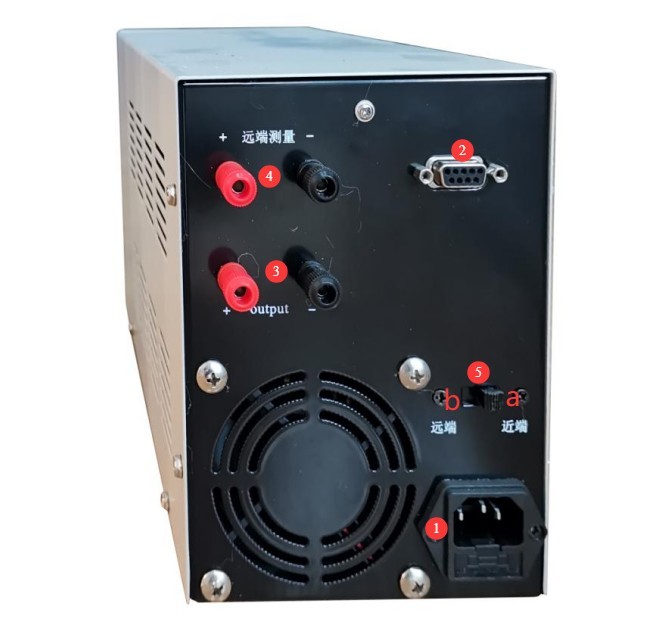
| رقم الهاتف | ملاحظات | |
| ① | Power cord receptacle, with a fuse, for connecting the device to an appropriate power source | |
| ② | RS-232 communication port: If you need to use other software to configure and control the power output, please connect it to a computer. | |
| ③ | منافذ الإخراج؛ لها نفس وظيفة منافذ الإخراج الموجودة على اللوحة الأمامية للجهاز | |
| ④ | The external sampling terminal, which is also connected to your DC load, allows you to obtain a more accurate load-side voltage. If you require high voltage sampling accuracy, please connect it; leaving it unconnected does not affect the DC power supply’s output functionality. Be sure to observe the correct polarity when wiring. | |
| ⑤ | Sampling Selector Switch | The factory default is Side A, with internal sampling. |
| If you have an external sampling terminal connected, switch to Side B for external sampling. | ||
Note 1: External sampling uses a 4-wire configuration to eliminate cable voltage drop; internal sampling includes cable voltage drop.
Note 2: For the output terminals, connect either the front panel or the rear panel—one or the other is sufficient.
4. تشغيل المعدات
4.1 Verification of OVP/OCP Settings
To ensure normal operation, the device is set to its maximum output value at the factory. For example, for the DC3005S, the OVP value is set to 30 and the OCP value is set to 5. If you need to review and adjust these settings, follow the steps below.
| تعليمات | ملاحظات |
| ① | Press the OVP Set button; the voltage display will show the currently set OVP value. If it is incorrect, you can use the numeric keys to reset it, then press the ENTER key to confirm. |
| ② | Press the OCP Set button; the current display will show the currently set OCP value. If it is incorrect, you can use the numeric keys to reset it, then press the ENTER key to confirm. |
4.2 خرج الجهد الثابت
| تعليمات | ملاحظات |
| ① | If you want the device to save the settings, press the corresponding memory button first. |
| ② | Press the I-Set key to set the current to the maximum output value, or at least to a value sufficient for constant-voltage output. Use the numeric keys to set the value directly, then press the ENTER key to confirm. |
| ③ | Press the V-Set key to set the voltage to the desired rated value, then press the ENTER key to confirm. |
| ④ | Press the ON/OFF button to control the output; the CV indicator lights up when the output is active. |
Note: If, during output, the CV indicator turns off and the CC indicator turns on, the set current value is insufficient to maintain the rated voltage of the DC load; you will need a DC power supply with a higher maximum output current.
4.3 خرج التيار الثابت
| تعليمات | ملاحظات |
| ① | If you want the device to save the settings, press the corresponding memory button first. |
| ② | Press the V-Set key to set the voltage to the maximum output value, or at least to a value sufficient for constant-current output. Use the numeric keys to set the value directly, then press the ENTER key to confirm. |
| ③ | Press the I-Set button to set the current to the desired rated value, then press the ENTER button to confirm. |
| ④ | Press the ON/OFF button to control the output; the CC indicator light turns on when the output is active. |
Note: If, during debugging, the CC indicator turns off and the CV indicator turns on, this indicates that the set voltage value is insufficient to meet the rated current output of the DC load. You will need a DC power supply with a higher maximum output voltage.
5. الصيانة اليومية للمعدات والعناية بها
5.1 الصيانة الروتينية
5.1.1 التنظيف اليومي
تأكد من إيقاف تشغيل الطاقة وفصل سلك الطاقة قبل التنظيف. نوصي بمسح الجهاز بقطعة قماش قطنية ناعمة مضادة للكهرباء الساكنة ومنظف معتدل؛ تجنب رش السوائل مباشرة على الجهاز. لا تستخدم مذيبات كيميائية مثل البنزين أو التولوين أو الأسيتون.
5.1.2 عمليات التفتيش الروتينية
قبل كل استخدام، تأكد من أن سلك الطاقة وتوصيلات الأطراف آمنة وخالية من علامات الحرق؛ وتأكد من عدم انسداد فتحات التهوية؛ وبعد تشغيل الوحدة، تحقق من أن أضواء المؤشر والشاشة تعمل بشكل صحيح.
5.2 مواصفات التخزين
5.2.1 متطلبات بيئة التخزين
درجة الحرارة: من 5 درجات مئوية إلى 35 درجة مئوية؛ الرطوبة النسبية: ≤65% رطوبة نسبية؛ بيئة جافة وخالية من الغبار والغازات المسببة للتآكل.
5.2.2 عمليات التخزين طويلة الأجل
Turn off the power and unplug all cables; clean the equipment and wrap it in dust-proof film; turn on the power for 10 minutes every 3 months to prevent moisture damage to the components.
استكشاف الأخطاء وإصلاحها وحل المشكلات الشائعة
| أعراض الخلل | الأسباب المحتملة | العملية |
| تعذر تشغيل الجهاز | سلك الطاقة غير مُحكم، فيوز محترق | قم بإيقاف تشغيل الطاقة وتحقق من توصيل سلك مصدر الطاقة المدخل؛ قم بإيقاف تشغيل الطاقة، وابحث عن دوائر قصر أو أحمال زائدة، واستبدل المصهر بآخر من نفس النوع، ولا تقم بزيادة تصنيف التيار. |
| The settings are fine, but the OCP and OVP indicator lights are on. | Output Short Circuit, Output Out-of-Limits, and Device Overheating Protection | Stop output, check the output wiring, and retry after ruling out a short circuit; verify that the load’s rated voltage and current are within limits—for example, the maximum output voltage and current for the DC3005S model are 30V and 5A; shut down the unit, allow it to ventilate, clean the ventilation openings, and restart it after it has cooled down. |
| المروحة لا تدور | تراكم الغبار، عطل في المحرك | قم بإيقاف تشغيل الطاقة وتنظيف الغبار من المروحة؛ إذا استمرت المشكلة، يرجى الاتصال بنا لإصلاحها أو استبدالها. |
7. قائمة التعبئة
| رقم | الاسم | الكمية |
| ① | DC-S Series Power Supply Unit | 1 حدة |
| ② | السلطة الحبل | 1 قطعة |
| ③ | كابل اتصال RS-232 |