
 الإنجليزية
 中文简体
中文简体 Русский
 Español
 Português
 Türkçe
 العربية
 Deutsch
 Polski
 Italiano
 Français
 한국어
한국어 ไทย
ไทย Tiếng Việt
 日本語
日本語












مزود طاقة تيار مستمر رقمي بتيار ثابت وجهد ثابت
مستخدم المالكين
قابل للتطبيق LISUN models: DC100020B、DC12010B、DC12030B、DC3050B、DC50010B
1. فتح العلبة والتعرف الأساسي على المعدات
1.1 المواصفات الفنية الرئيسية
| المواصفات/أرقام الطراز | DC3050B | DC12030B | DC50010B |
| Maximum Output Voltage and Current | 30 V / 50 A | 120 V / 30 A | 500 V / 10 A |
| قرار الجهد | 0.01 V (<100 V); 0.1 V (>100 V) | ||
| دقة الجهد | ± 0.1 فولت | ||
| القرار الحالي | 0.01 A (<100 A); 0.1 A (>100 A) | ||
| الدقة الحالية | ±0.1 أمبير | ||
1.2 فحص الملحقات والتحقق منها بعد فتح العلبة
1.2.1 فك التغليف والفحص البصري
عند إخراج الجهاز من العبوة، تعامل معه برفق لتجنب خدش الغلاف الخارجي بأدوات حادة. بعد إخراجه، افحص الجزء الخارجي من الجهاز للتأكد من عدم وجود أي تشوه أو انبعاجات ظاهرة، وأن الأزرار سليمة وغير مفكوكة. إذا لاحظت أي خلل في الجهاز أو ملحقاته، فلا تقم بتشغيله. يرجى الاتصال بنا فورًا.
1.2.2 الوحدة الرئيسية والملحقات
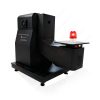
Host: 1 DC-B Series power supply, with the input power supply cord pre-installed.
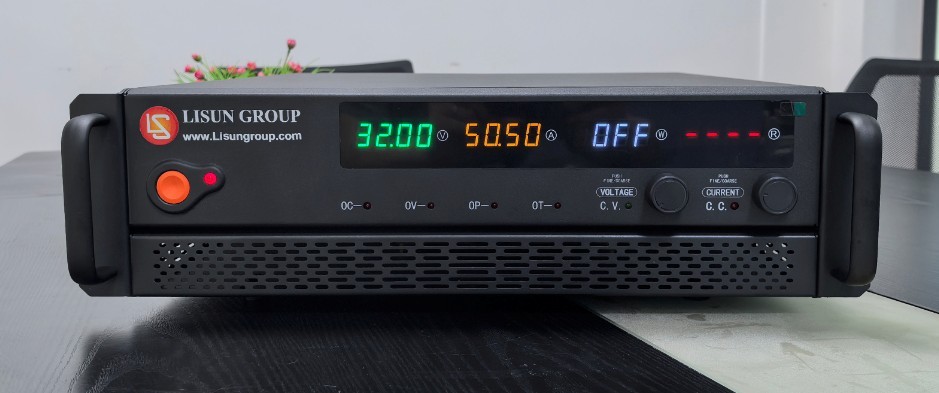
الشكل 1
Other accessories are as follows:
| رقم الهاتف | ملاحظات |
| ① | Equipment Handle Mounting Accessories |
| ② | كبل USB |
| ③ | كابل RS-232 |
| ④ | Sampling Line Accessories |
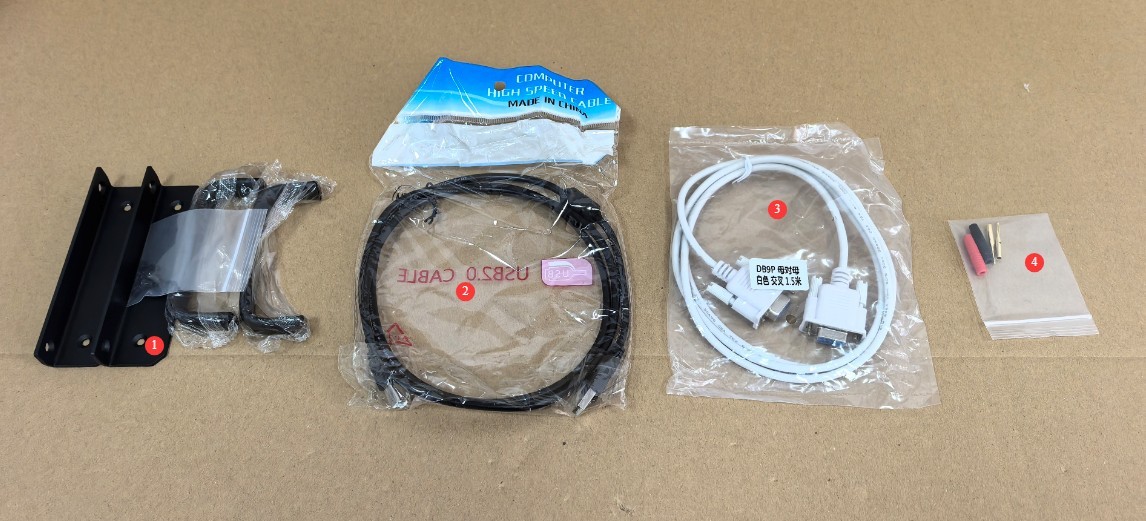
الشكل 2
Note: The standard DC-B unit does not include PC software and does not require a USB or RS-232 cable. If you need to use PC software to control the DC power output, please contact us for a custom solution.
Links to download the electronic user manual, warranty card, and other documents have been sent via email. Please download them as soon as possible. If you missed the email, please feel free to contact us to receive the download links again.
2. احتياطات السلامة
2.1 معايير السلامة الكهربائية
The equipment requires a single-phase AC 220 V ±10 V input power supply that complies with safety standards and is equipped with a proper protective grounding system to prevent electric shock.
2.2 معايير السلامة البيئية
For indoor use only; avoid direct sunlight. Place on a sturdy, stable surface to avoid severe vibrations. Keep away from dust, corrosive gases, and flammable or explosive materials. Keep away from strong magnetic and electric fields. Ensure good ventilation; leave at least 10 cm of space around the device for heat dissipation, and do not block the cooling fan vents. Operating Environment: Temperature 5°C to 35°C, relative humidity <65% RH.
2.3 إرشادات السلامة التشغيلية
Do not operate the equipment or plug in/unplug the power cord with wet hands; the output must be turned off before connecting or disconnecting wires; allow the unit to warm up for at least 10 minutes after powering on before enabling the output; Do not touch the output terminals, internal components, the load, or the load wiring while the equipment is operating; allow at least 3 minutes between powering on and off to prevent damage from electrical surges; do not shut down the equipment directly while it is in output mode; first shut off the output before powering down; if you notice an unusual odor, smoke, unusual noise, or overheating, immediately disconnect the power and do not continue operation.
3. نظرة عامة على المعدات والأسلاك
3.1 مقدمة عن اللوحة الأمامية
| رقم الهاتف | ملاحظات |
| ① | مفتاح الطاقة |
| ② | الناتج التبديل |
| ③ | Voltage Display Window V |
| ④ | Current Display Window A |
| ⑤ | Power display window W; displays “OFF” when no power is being output |
| ⑥ | Equivalent impedance display window R; displays “—-” when no output is present. |
| ⑦ | حماية التيار الزائد |
| ⑧ | الحماية من الفولت الزائد |
| ⑨ | حماية من الطاقة الزائدة |
| ⑩ | حماية من الحرارة الزائدة |
| ⑪ | مؤشر ضوئي لخرج الجهد الثابت (CV) |
| ⑫ | مقبض التحكم في الضغط |
| ⑬ | مؤشر ضوئي لخرج التيار الثابت (CC) |
| ⑭ | Flow Control Knob |
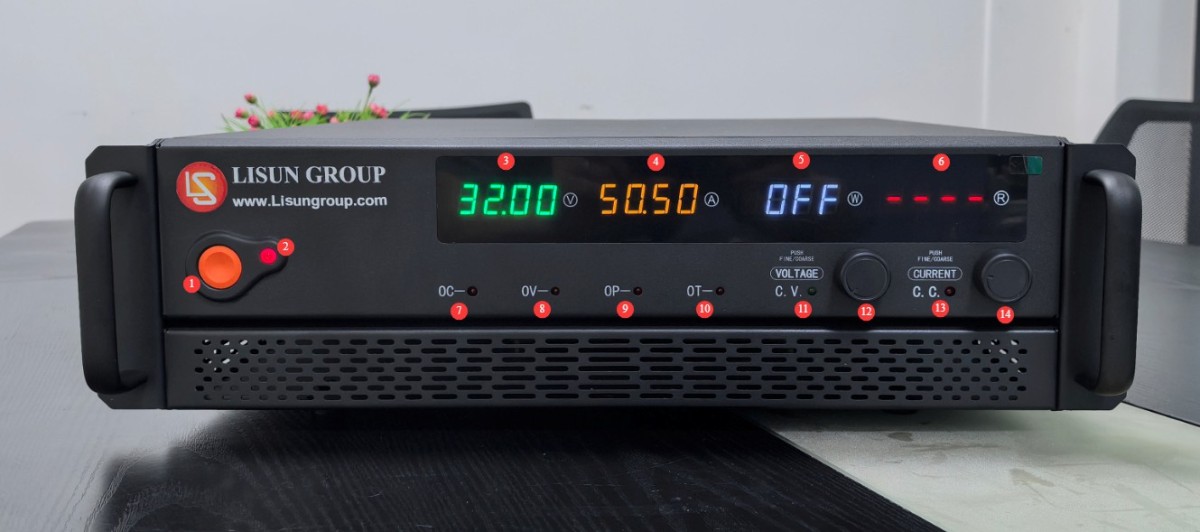
الشكل 3
3.2 About the Back Panel
3.2.1 Regarding the Input Power Supply Cord
Depending on the power rating of the equipment, the pre-installed power cord will vary.
| رقم الهاتف | ملاحظات |
| ① | Low-power devices come pre-installed with standard mains power plugs |
| ② | High-wattage appliances come pre-installed with thicker power cords; do not plug them directly into low-wattage outlets. |
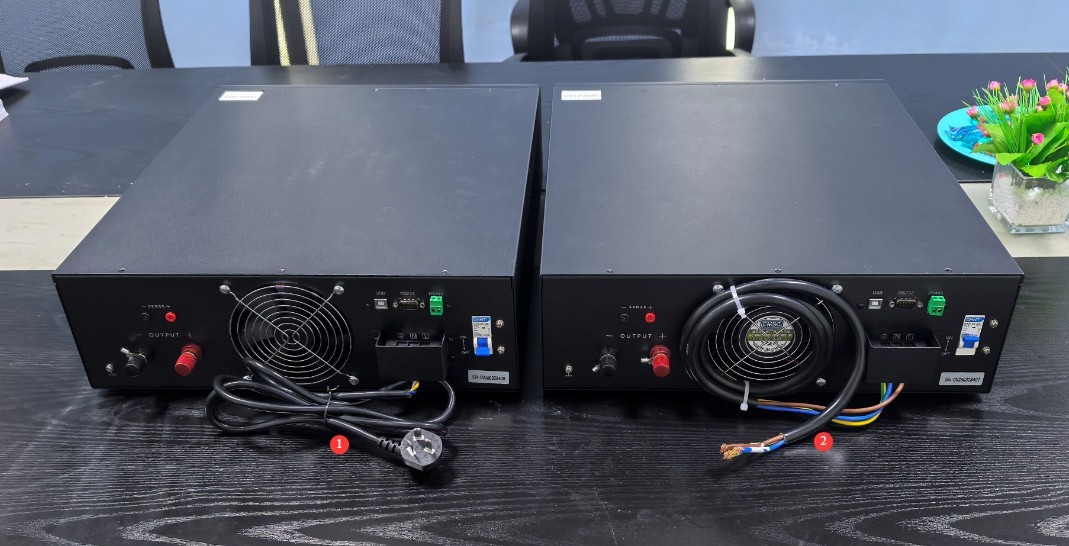
الشكل 4
3.2.2 مقدمة عن اللوحة الخلفية والأسلاك
| رقم الهاتف | ملاحظات |
| ① Power cord | Connect the device to an appropriate power source |
| ② Power Circuit Breaker | |
| ③ Output Terminals | Connect to your DC load |
| ④ Sampling Terminal | It also connects to your DC load, allowing you to obtain a more accurate load-side voltage. If you require high voltage sampling accuracy, please connect it; leaving it unconnected does not affect the DC power supply’s output functionality. |
| ⑤ Ground Terminal | If your load requires a ground connection, you can connect its ground wire to this terminal. |
| ⑥ Communication Port | If you need the device to communicate with a computer, connect a USB/RS232/RS485 cable to the computer. |
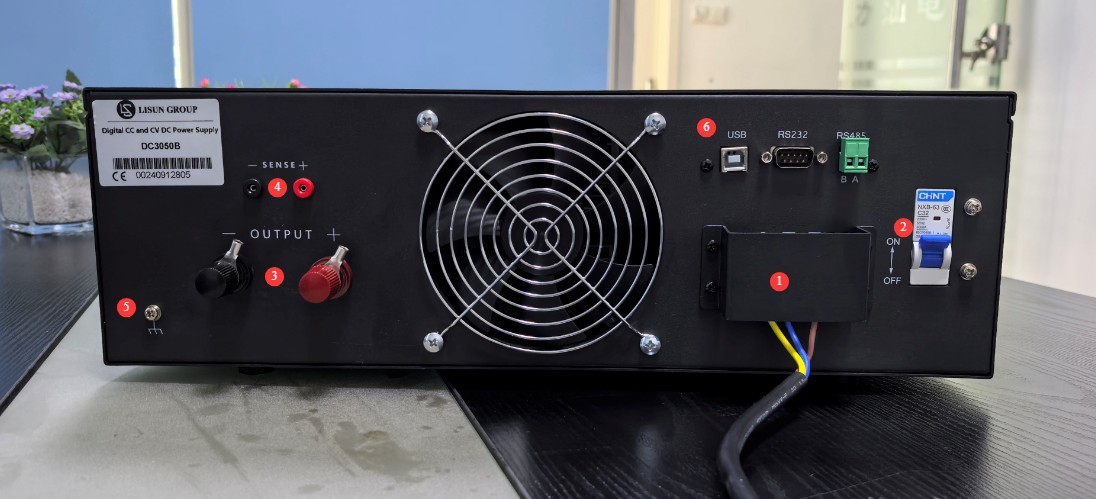
الشكل 5
Note: If the sampling terminals are connected, this is a 4-wire sampling configuration, which eliminates cable voltage drop; if the sampling terminals are not connected, cable voltage drop is included.
4. تشغيل المعدات
4.1 خرج الجهد الثابت
4.1.1 Current Adjustment
If constant-voltage output is required, the current serves as a current-limiting reference. You can set it directly to the maximum value, or at least to a value sufficient to maintain the set constant voltage. If the current is set too low, the current limit will be triggered, and constant-voltage output cannot be maintained.
| تعليمات | ملاحظات |
| ① | Press the current adjustment knob, and the last digit in the current display window will begin to flash. |
| ② | Turn the flow control knob to change the digit in that position. |
| ③ | Continue pressing the flow adjustment knob to cycle through the other digits, and use the same method to change each digit. |
| ④ | After completing the setup, wait 2 seconds; the device will automatically exit setup mode. |
4.1.2 Adjusting the Voltage
If a constant-voltage output is required, set the voltage to the load’s rated voltage.
| تعليمات | ملاحظات |
| ① | Press the voltage adjustment knob, and the last digit of the voltage display will begin to flash. |
| ② | Turn the volume control knob to change this digit. |
| ③ | Continue pressing the voltage adjustment knob to cycle through the other digits, and use the same method to change that digit. |
| ④ | After completing the setup, wait 2 seconds; the device will automatically exit setup mode. |
4.1.3 Turn Output On/Off
Example: I need a constant-voltage output of 22V. Set it up as follows.
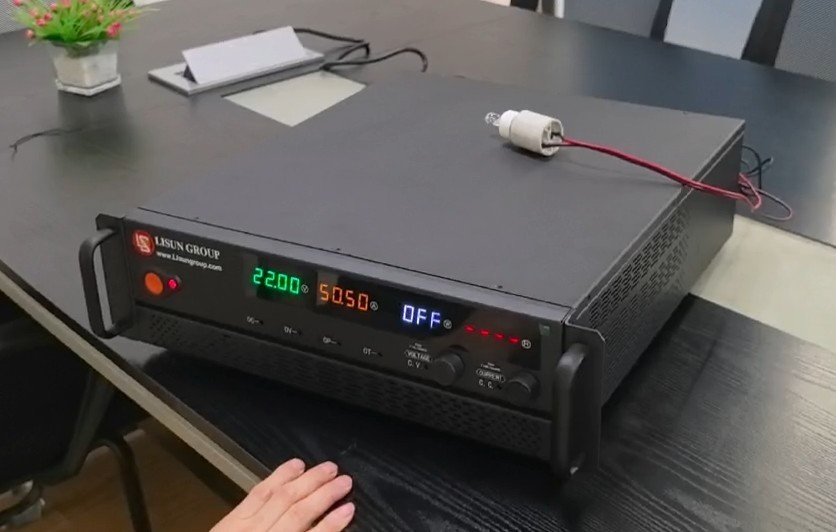
الشكل 6
| رقم الهاتف | ملاحظات |
| ① | Press the output switch to activate the output. |
| ② | The constant-voltage indicator light is on, and the device is in constant-voltage output mode. |
| ③ | The voltage display window shows the output voltage, which matches the set value. |
| ④ | The current display window shows the output current. It does not need to match the set value, but the set value must be higher than the actual value; otherwise, constant-voltage output will not be possible. |
| ⑤ | The power display window shows the output power. |
| ⑥ | The Equivalent Impedance window displays the equivalent impedance of the current output line. |
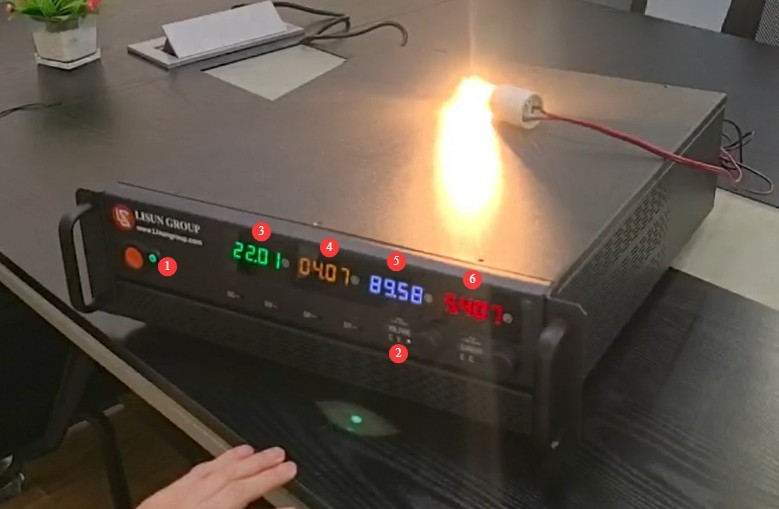
الشكل 7
Press the output switch again to turn off the output.
4.2 خرج التيار الثابت
4.2.1 Adjusting the Voltage
If constant-current output is required, the voltage serves as the over-voltage limit reference. You can set it directly to the maximum value, or at least to a value that satisfies the set constant-current value. If the voltage is set too low, it will trigger the over-voltage limit, and the constant-current output cannot be maintained.
For instructions on adjusting the voltage, see Section 4.1.2.
4.2.2 Current Adjustment
If a constant current output is required, set the current value to the load’s rated current.
For instructions on adjusting the current, see Section 4.1.1.
4.2.3 Turning the Output On/Off
Example: I need a constant current output of 4.00 A. Set it up as follows.
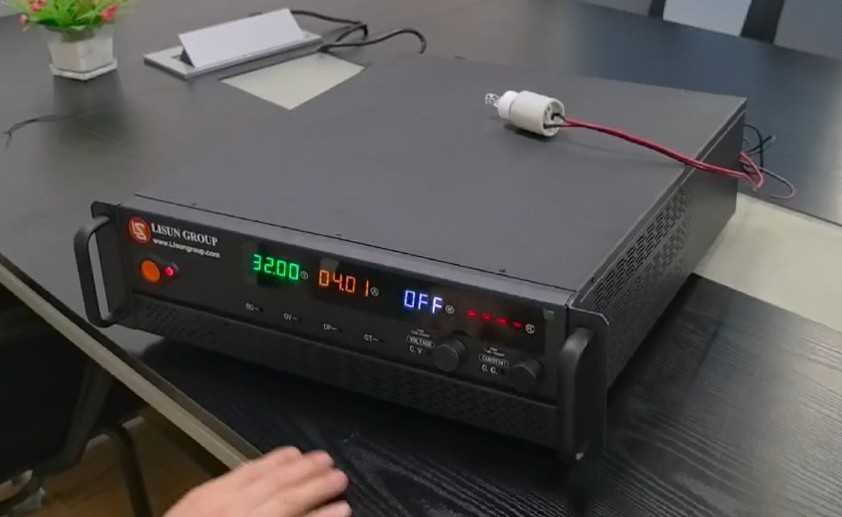
الشكل 8
| رقم الهاتف | ملاحظات |
| ① | Press the output switch to activate the output. |
| ② | The constant-current indicator is lit, and the device is in constant-current output mode. |
| ③ | The voltage display window shows the output voltage, which does not need to match the set value; however, the set value must be higher than the actual value, otherwise constant-current output will not be possible. |
| ④ | The current display window shows the output current, which matches the set value. |
| ⑤ | The power display window shows the output power. |
| ⑥ | The Equivalent Impedance window displays the equivalent impedance of the current output line. |
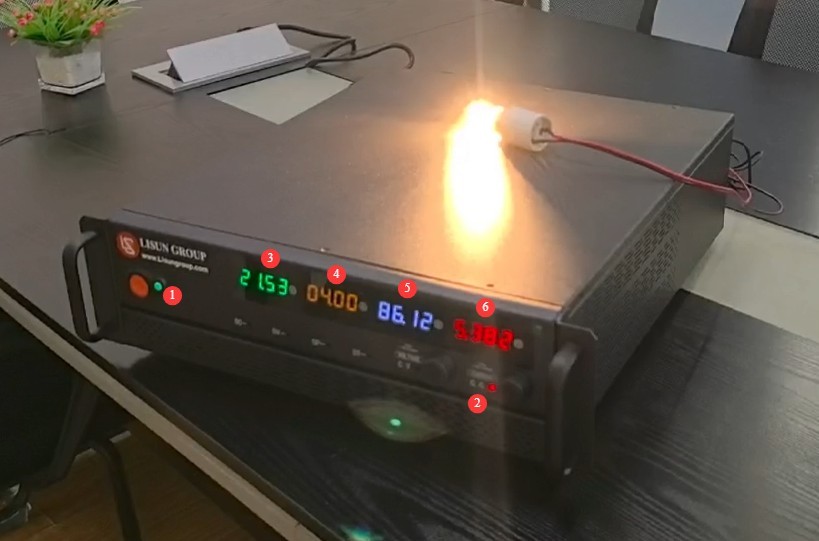
الشكل 9
Press the output switch again to turn off the output.
5. الصيانة اليومية للمعدات والعناية بها
5.1 الصيانة الروتينية
5.1.1 التنظيف اليومي
تأكد من إيقاف تشغيل الجهاز وفصل سلك الطاقة قبل التنظيف. ننصح بمسح الجهاز بقطعة قماش قطنية ناعمة مضادة للكهرباء الساكنة ومنظف معتدل؛ تجنب رش السوائل مباشرة على الجهاز. لا تستخدم مذيبات كيميائية مثل البنزين أو التولوين أو الأسيتون.
5.1.2 عمليات التفتيش الروتينية
Before each use, check that the power cord and terminal connections are secure and free of burn marks; ensure that the fan vents are not blocked; and after turning on the unit, verify that the indicator lights and display are functioning properly.
5.2 مواصفات التخزين
5.2.1 متطلبات بيئة التخزين
Temperature: 5°C to 35°C; relative humidity: <65% RH; dry, dust-free environment free of corrosive gases.
5.2.2 عمليات التخزين طويلة الأجل
قم بإيقاف تشغيل الطاقة وافصل جميع الكابلات؛ نظف الجهاز وقم بتغليفه بغشاء مقاوم للغبار؛ قم بتشغيل الطاقة لمدة 10 دقيقة كل شهر لمنع تلف المكونات بسبب الرطوبة.
استكشاف الأخطاء وإصلاحها وحل المشكلات الشائعة
6.1 Equipment Alarm Indicator Lights
| أعراض الخلل | الأسباب المحتملة | العملية |
| The OV indicator light is on | الحماية من الفولت الزائد | Turn off the output, check that the voltage setting does not exceed the device’s maximum output voltage, and then turn the output back on. |
| The OC indicator light is on | Overcurrent Protection, Load Short Circuit | Turn off the output; check that the current setting does not exceed the device’s maximum output current; check the load, rule out a short circuit, and then resume output. |
| The OP indicator light is on | حماية من الطاقة الزائدة | Turn off the output, reduce the voltage/current, and lower the load power, then resume output |
| The OT indicator light is on | حماية من الحرارة الزائدة | Turn off the output, let the device cool down by disconnecting the power, clean the fan vents to improve heat dissipation, and then restart the device once it has cooled down and try again. |
6.2 أعطال أخرى
| أعراض الخلل | الأسباب المحتملة | العملية |
| تعذر تشغيل الجهاز | Loose input power supply cord, blown fuse | Turn off the power and check the input power supply cord connection; turn off the power, troubleshoot for short circuits or overloads, replace the fuse with one of the same rating, and do not use a fuse with a higher current rating. |
| Output parameters are incorrect | Incorrect voltage and current settings | Please refer to Chapter 4 to set the parameters correctly. |
| المروحة لا تدور | تراكم الغبار، عطل في المحرك | Turn off the power and clean the dust from the fan. If the problem persists, please contact us for repair or to have the fan replaced. |