
 الإنجليزية
 中文简体
中文简体 Русский
 Español
 Português
 Türkçe
 العربية
 Deutsch
 Polski
 Italiano
 Français
 한국어
한국어 ไทย
ไทย Tiếng Việt
 日本語
日本語











متر اللمعان
مستخدم المالكين
قابل للتطبيق LISUN الموديلات: AGM-500PRO
1. فتح العلبة والتعرف الأساسي على المعدات
1.1 المواصفات الفنية الرئيسية
| المواصفات/أرقام الطراز | AGM-580 | AGM-500 | AGM-500PRO |
| اسم المنتج | مقياس اللمعان ثلاثي الزوايا | مقياس اللمعان أحادي الزاوية | |
| قياس الزوايا | 20 درجة ، 60 درجة ، 85 درجة | 60° | |
| نطاق القياس | 20°: 0–2000 GU | لا يوجد | |
| 60°: 0–1000 GU | 60°: 0–1200 GU | ||
| 85°: 0–160 GU | لا يوجد | ||
1.2 فتح العلبة والتحقق من المحتويات
1.2.1 فك التغليف والفحص البصري
When unpacking the device, handle it gently to avoid scratching the outer casing with sharp tools. After unpacking, first inspect the exterior of the device to ensure there are no obvious deformities or dents, and that the buttons are not damaged or loose. If you notice any abnormalities with the device or its accessories, please contact us immediately.
1.2.2 الوحدة الرئيسية والملحقات
| رقم الهاتف | ملاحظات |
| ① | AGM-500PRO main unit; the calibration substrate is attached to the measurement window at the bottom of the main unit |
| ② | كبل USB |
| ③ | قطعة قماش للتنظيف |
| ④ | دليل البدء السريع |
| ⑤ | حبل بطاقة التعريف |
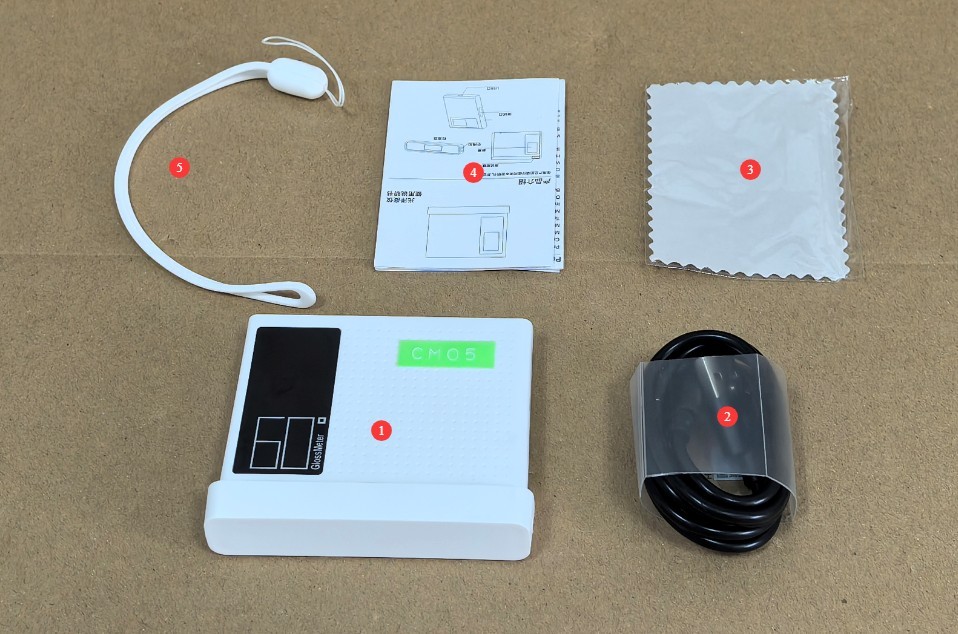
الشكل 1
تم إرسال روابط تحميل دليل المستخدم الرقمي، والبرامج، وبطاقة الضمان، وغيرها من المواد عبر البريد الإلكتروني. يُرجى تحميلها في أقرب وقت ممكن. إذا لم يصلك البريد الإلكتروني، يُرجى التواصل معنا لطلب روابط التحميل مرة أخرى.
1.3 نظرة عامة على المعدات
1.3.1 واجهة الجهاز
| رقم الهاتف | ملاحظات |
| ① | مضيف |
| ② | Device buttons: Power On (press briefly while the device is off), Measure (press briefly while the device is on), Auto Continuous Measurement (press and hold for 2 seconds while the device is on), Power Off (press and hold for 5 seconds while the device is on) |
| ③ | The measurement results show that |
| ④ | Calibration Base Plate |
| ⑤ | Calibration of Gloss Data for Base Plates |
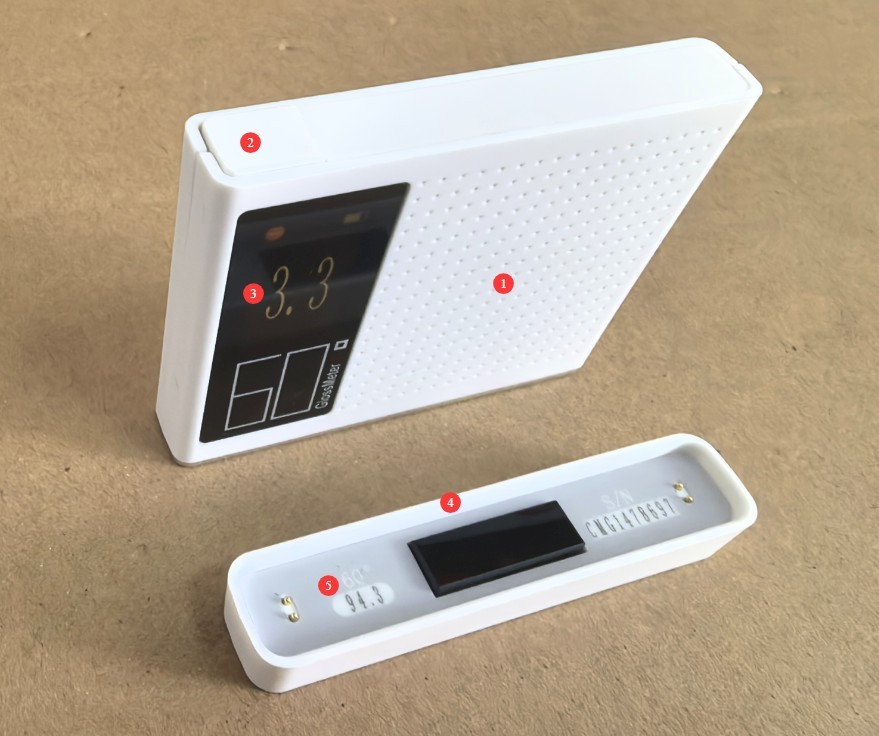
الشكل 2
1.3.2 الجزء السفلي وجوانب الجهاز
| رقم الهاتف | ملاحظات |
| ① | نافذة القياس |
| ② | The USB port is located on the side; you can charge the device using a USB cable. |
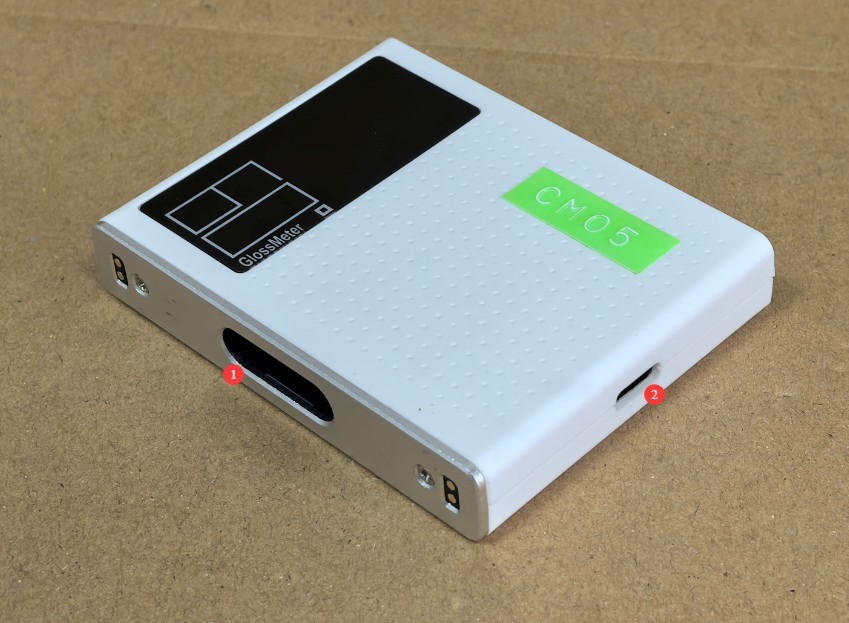
الشكل 3
2. احتياطات الاستخدام
2.1 الاحتياطات قبل التشغيل
2.1.1 تهيئة البيئة
Before taking a measurement, allow the device and the sample to rest in the same environment for at least 30 minutes to ensure their temperatures are the same. The measurement environment must be free from direct strong light and stray light interference. Avoid operating in environments with high temperatures, high humidity, or excessive dust. The ambient temperature should be maintained between 10°C and 35°C, with relative humidity ≤80%(no condensation).
2.1.2 تحضير العينة
يجب أن يكون سطح العينة المراد فحصها مستويًا ونظيفًا وخاليًا من البقع والخدوش. بالنسبة للعينات المسحوقة أو السائلة، استخدم طبقًا مخصصًا للعينات لضمان تغطية العينة لنافذة القياس بالكامل دون أي فراغات. أما بالنسبة للعينات غير منتظمة الشكل، فتأكد من أن مسبار القياس مُحكم التثبيت على منطقة القياس في العينة لمنع تسرب الضوء.
2.1.3 فحص المعدات
Before turning on the device, check the measurement window for dust or stains, and ensure that the buttons and ports are functioning properly. After turning on the device, check that the battery is sufficiently charged (if the battery is low, charge it first to avoid a power outage during measurement).
2.2 احتياطات للاستخدام
2.2.1 إجراءات القياس
When taking a measurement, place the device’s measurement window directly against the sample’s surface, avoiding any tilting or light leakage. After pressing the device’s button, keep the device still until the measurement is complete (1 second); do not move the device during the measurement process. It is recommended to take 3–5 measurements of the same sample and use the average as the final result to minimize measurement error.
2.2.2 موانع استخدام المعدات
لا تلمس المكونات البصرية داخل نافذة القياس بيديك، ولا توجه نافذة القياس نحو مصدر ضوء قوي. ولأن هذا الجهاز محمول باليد، تجنب إسقاطه أو صدمه أو سحقه، وتجنب تعريضه للماء أو أي سوائل أخرى.
2.3 تحذيرات السلامة
لا تحاول تفكيك أو استبدال أي أجزاء داخلية للجهاز. في حال حدوث عطل، اتصل بخدمة العملاء الرسمية أو بموزع معتمد للحصول على المساعدة. التفكيك غير المصرح به يُبطل الضمان.
If liquid, dust, or other substances enter the device, immediately turn off the power, unplug the charging cable, and contact customer service right away. Do not continue to use the device;
Do not place the device near heat sources, open flames, or in high-temperature environments to prevent the battery from swelling or damage to the device’s components.
3. تشغيل المعدات
3.1 Measurement and Calibration Base Plate
| تعليمات | ملاحظات |
| ① | Place the device on the calibration base plate. |
| ② | Press and hold the device button briefly to take a measurement. |
| ③ | Review the measurement results and compare them with the values marked on the calibration plate. If they match, the device is functioning properly. If they do not match, please refer to Section 4.1.1, clean the measurement window and the calibration plate, and try again. |
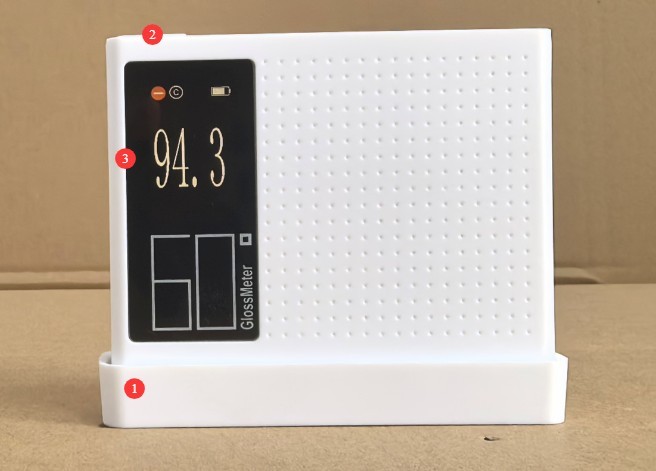
الشكل 4
3.2 قياس العينة
| تعليمات | ملاحظات |
| ① | Place the device directly against the surface of the sample so that the sample completely covers the device’s measurement window. |
| ② | Press the device button briefly to take a measurement; press and hold the device button for 2 seconds to take a continuous measurement. |
| ③ | View Measurement Results |
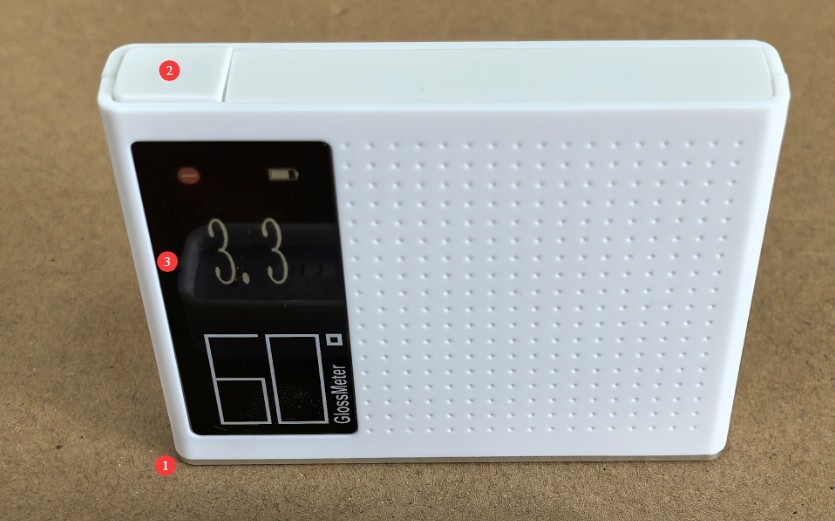
الشكل 5
4. الصيانة اليومية للمعدات والعناية بها
4.1 التنظيف والصيانة
Body Surface: Wipe dust and stains from the body with a clean, soft cloth. For stubborn stains, lightly wipe the area with a small amount of water. Do not use detergents or other corrosive liquids;
الشاشة: امسح الشاشة برفق بقطعة قماش مخصصة لتنظيف الشاشات لتجنب خدشها. لا تلمس الشاشة مباشرةً بأصابعك. إذا تراكم الغبار على الشاشة، أزله برفق بفرشاة ناعمة خالية من الوبر.
Measurement Window and Calibration Base Plate: Clean with the provided cleaning cloth. If there are stubborn stains, contact us promptly for maintenance. Do not attempt to sand or repair the calibration base plate yourself.
4.2 صيانة البطارية
4.2.1 الشحن والصيانة
Use the device’s standard USB cable; do not use non-standard fast-charging cables or high-wattage chargers to avoid damaging the battery. Avoid charging the device in high-temperature environments, and unplug the charging cable immediately after charging is complete to prevent overcharging. Charge the device promptly when the battery level falls below 15% to avoid deep discharge of the lithium-ion battery, which can shorten its service life.
4.2.2 صيانة عمر البطارية
بطارية الليثيوم المدمجة في الجهاز قابلة لإعادة الشحن؛ في ظل الاستخدام العادي، تسمح الشحنة الواحدة بإجراء 15000 قياس متتالي؛
When the device is not in use for an extended period, ensure that the battery charge level remains between 50% and 80%. Recharge the battery once every three months to restore the charge level to between 50% and 80%, thereby preventing the battery from becoming deeply discharged or swelling;
إذا ظهرت على البطارية علامات انتفاخ أو تسرب أو انخفاض كبير في عمر البطارية، فتوقف عن استخدامها على الفور واتصل بنا لإصلاحها.
5. استكشاف الأخطاء وإصلاحها وحل المشكلات الشائعة
| أعراض الخلل | الأسباب المحتملة | العملية |
| تعذر تشغيل الجهاز | البطارية ضعيفة | يرجى استخدام كابل USB المخصص لشحن الجهاز؛ إذا لم يتم تشغيله بعد الشحن، فيرجى الاتصال بنا لإصلاحه. |
| تدهور عمر البطارية | تدهور البطارية، ارتفاع درجة الحرارة المحيطة | Contact us for repairs; using the device in high-temperature environments causes the battery to drain quickly. Please use it in a normal environment. |
| أخطاء كبيرة في بيانات القياس | العينة غير متجانسة أو لا تغطي نافذة القياس بالكامل؛ لوحة المعايرة ملوثة؛ نافذة القياس ملوثة | استبدلها بعينة مناسبة؛ نظف أو استبدل لوحة المعايرة؛ نظف نافذة القياس؛ إذا كانت هناك بقع عنيدة، فاتصل بنا للحصول على الخدمة. |